Number of problems with my V6 box
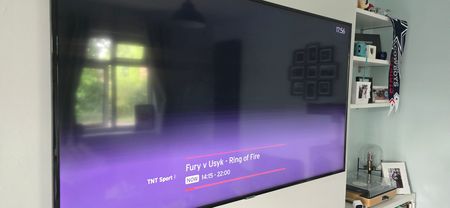
Hello all! Just wondering if there is any way I could fix the following problems? When on delay I get to a point in the program and it just stops and forces you back to live TV. The streaming apps don't load a lot of the time. Icons don't load on the menu either, just a bunch of blank boxes. This is both app logos and channel logos. My streaming apps keep getting signed out which is annoying everytime I want to watch something Sometimes I get code cs2400. I have my router (also Virgin) quite close to the TV (due to location of plugs/connection box). The V6 is connected via ethernet so it shouldn't be an internet problem. On another note, when I first received my router the on light is orange rather than white. I looked it up and it says it's because it may be refurbished and reused item. My internet both wireless and ethernet work fine as far as I know. I tried connecting the V6 by WiFi instead of ethernet but nothing improved. I also tried turning everything off by the mains and left the plug out for the right amount of time. The box seemed to work for a bit but then went back to how it was. I don't know whether I've just got a dodgy V6 box that needs replacing or if there is anythingI could do?261Views0likes6CommentsCan't log in to Sky Sports app via VM log in
Hi all, I'm posting on behalf of my stepdad who has had recurring issues with the Sky Sports app for about a week now. I've tried repeatedly to uninstall the app - remove its data and caches, to no avail. As someone quite comfortable with computers, I am truly baffled. The Virgin Media TV app works absolutely fine. I get up the Sky Sports app and go to watch live sports (tennis for example) and am immediately brought to the Sky sign in page where there is an option to log in with Virgin TV UK as he's done so in the past and instead get a hapless loading bar that never loads a thing. It's stopped my elderly stepdad from watching his beloved cricket and tennis anywhere that isn't the big TV in the family home. Any advice or tips (beyond the obvious) would be much appreciated as I'd really like to get this resolved for him ASAP. It's really important to him and therefore really important to me! Cheers158Views0likes1CommentLandline Voicemail not recording messages
Hi I have noticed my Landline Voicemail is no longer recording messages left. I have tested this by phoning from my mobile and leaving myself a message but the message appears not to have been recorded. The Voicemail says there is a saved message but it is blank when it is played. Thanks222Views0likes6CommentsFlex / stream not allowing subscriptions to be added
I have recently joined Virgin and had a Flex stream box installed. My first impression is that I'm very happy with the box, it is proving to be alot quicker than BT. However, I'm unable to manage my Stream Box subscriptions so I can't add/remove any subscriptions to the box (Sky Sports or TNT Sports etyc). When I try doing it through the box, I just get an error message telling me there's a technical problem at the moment and it shows me a QR code that takes me to virginmedia.com/manage-stream. When I use this link and log in to my account, I can see that Stream is on my account but when I click on Manage, I get an error message again and I'm unable to add or remove anything. This has been going on for five days now. I've checked online and found quite a few posts on this forum about this so I'm not the only one having this problem. However, I haven't been able to find any solutions to this. I have raised the issue with the help line and they sent out an engineer to change the box but that didnt work. The engineer then spent an hour on the phone trying to resolve the issue but without any joy. Having looked through old streams on this community it would appear that the box / account hasnt been activated correctly, in a previous stream from 2022 it was suggested that someone from Virgin help team send a "hit" to the box and that activated it. However I can not get through again on the help desk to make that suggestion. Has anyone else had this issue recently? Does anyone have any ideas of how to approach this and how to fix it? Based on previous posts, calling VM seems pointless as customer service don't seem to know what a Stream Box is. Is anyone on this forum able to help?3.4KViews0likes16CommentsIP amd Port Filtering not working on home hub 3.
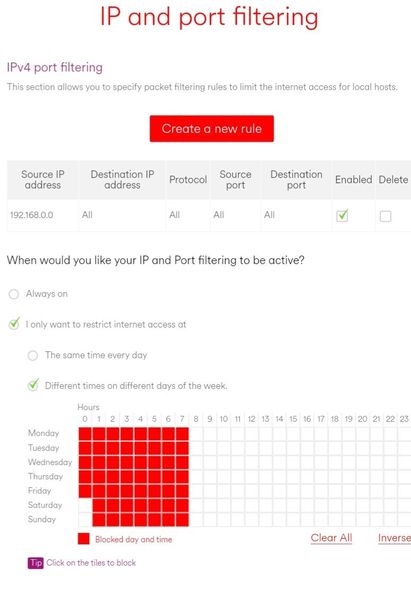
Hi there. My daughter keeps getting up at 5.30 to watch youtube and I want it to stop. I tried the virgin media connect app but it didn't work, presumably because I have split the WiFi ranges to two separate access points (5 and 2.4ghz). Therefore I tried doing this through the router using the IP and Port filtering section within advanced controls and security. I highlighted between 1pm and 7am on the router and selected all destination IP addresses, selected all, selected block all on specific dates and times. The router should, for all intents and purposes, be blocking Internet traffic between these hours BUT I woke up this morning to find out my daughter had been online since 5am. I'm really irritated with this since I keep forgetting to brick the router manually before bed As a summary, I have port triggering set up for my xbox, I still have the 2.4 and the 5ghz bands split into their separate access points, and I have named some devices so that I can identify them. Otherwise though, the settings are default. Can anyone advise what I am doing wrongSolved1.2KViews0likes6CommentsModem Mode Gone Rogue - Hub 5
Hi, Wondering if anyone can help/has experienced this before? I have a Hub5 and its been in modem mode since receiving it well over a year ago. This morning all my devices were not connecting to the internet of my main router, I checked the Hub5 and there was a solid white light on it, which indicates its acting “normally” as fully functioning router hub (wifi included) so I tried to connect using the modem mode address but that did not work, so connected to it using the standard web address and it looks like modem mode is no longer enabled. Will also add that wifi is disabled when I connect. When I try to switch back to modem mode it just idles. My main router is now actually connecting to the internet through it again, but surely to do this efficiently it needs to be in modem mode?? Has anyone had a similar issue?? [MOD EDIT: Subject title changed for clarity]590Views0likes2CommentsTP Link Power line Adapter won't WPS pair with Virgin Hub
Devices: Virgin Hub 3 and TP-LINK WPA4220 The power line Adapter works fine for Ethernet however the built in wifi range extender won't connect to the Hub 3.0 with WPS. I know the WPS isn't faulty on the hub as the tv box was set up using WPS yesterday and I know the TP-LINK isn't faulty as it worked a couple of days ago at my old place. Is this a known issue with TP-Link extenders or am I doing something wrong?6.8KViews0likes8CommentsInternet dropping every few hours, lost packages, intermittent connection (few years already)
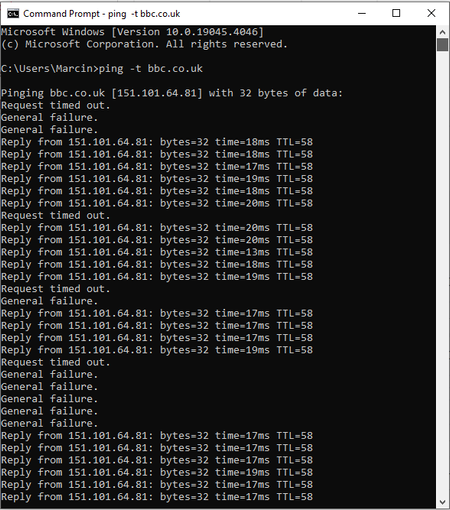
Dear Community, I would like to say thank you to anyone involved, and a big thank you for your time spent. I appreciate any work on this, especially since the issue began impacting me more when I started working from home occasionally. Also, online gaming become very frustrating. Problem: Internet dropping, lost packages, intermittent connection (a few years already) More info: It is happening on all devices, x2 wired PCs, and x2 laptops on wifi, and mobile phones. I have called Viring Media about it and they came and replaced my old hub with version 5 but still the same. I have been with Viring Media for the past 5 years and I noticed the issue about 3 years ago. The internet will work fine for a few hours straight until it starts to drop. The lost connection is intermittent, it will work for 1 minute just to stop for 20-30 seconds and again and gain from at least 10-15 minutes and then back to working again for another few hours. I am attaching some data that I have seen was useful on other similar threads. When I experience the issues I see this when pinging bbc. The Windows tray icon will show no internet. These were taken from the HUB when the internet was working fine, I can try to capture when this is happening if needed. Does anyone see something wrong here? Many thanks for all your help. Cheer Mart.1.5KViews0likes9Comments