Recent Content
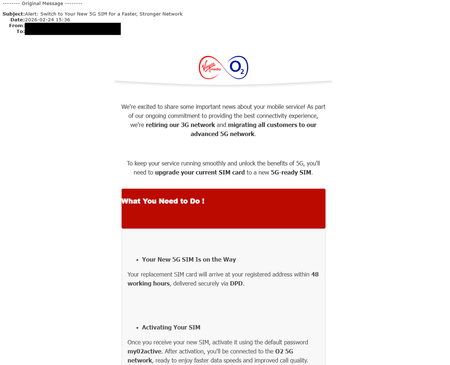
Latest Phishing News 25/02/2026
We’ve been made aware of phishing emails circulating that contain the content shown below. Please note that these emails were NOT sent by Virgin Media O2 and should NOT be responded to. Do not click on any links or reply to these messages. Instead, we recommend deleting them immediately. If you'd like to report the email, you can forward it to our dedicated phishing inbox at phishing@virginmediao2.co.uk.Int-Sec30 days agoModerator1.8KViews3likes0Comments
Main 360 box not connecting to 2nd 360 box
I have 2 virgin 360 boxes. The main one upstairs and 2nd downstairs. Both boxes will not connect to each other unless the one in the other room is switched on. So I can’t watch recordings from one box on the other. Google suggests boxes need to be on active start which they are. So no idea what the problem is?alled1 month agoJoining in5.3KViews4likes11CommentsTNT Olympics channels now live
TNT Sports Olympics 1 and 2 are now live on VMs networks. These channels are available to ALL TV customers, whether you subscribe to TNT Sports or not. TNT Sports Olympics 1 is on channels 140 and 527. TNT Sports Olympics 2 is on channels 141 and 528.nodrogd1 month agoVery Insightful Person1.5KViews2likes9CommentsNetflix virgin 360
Hi I've just received virgin 360 control today and having issues, Netflix should be part of my package and previously was available via a channel, now I'm being asked to login and either create an account with netflix or request an add on package, have tried contacting telephone support but not able to obtain any support, any advice welcome, thank youBuckFlair19651 month agoTuning in2.3KViews1like2CommentsTS2/3/1/2/ERR_400/302/400 yet again
I have been unable to add subscriptions on my flex/stream box either using the flex box itself, the My Virgin Media app or on line (using .com) since my renewal contract on 1st December. The error code TS2/3/1/2/ERR_400/302/400 is returned from the box all the time (like many others it would appear!) and the ability to manage flex subscriptions on line or via the app has also ceased. I have spoken to or chatted to goodness knows how many different people on the 3rd, 12th, 16th, 22nd and 31st December, and now 10th and 15th Jan. A ticket, number P013350570, was raised by Sushant on 12th Dec for your support team and said it would be resolved in a matter of days but nothing. Another ticket P013389622 has now (on the 10th January I believe) been raised. The 5 days turnaround often quoted is a bit of a joke really, it has been over a month since that first IT ticket was raised. Is there any moderator who might raise this to higher levels?chasrc21 month agoTuning in1.2KViews0likes12Comments
A Tale of Incompetence, Gaslighting, and Lies
This is a lengthy tale, which now spans 6 different webchats over a period spanning 8 January – 24 January. The PDF transcript of the chats is currently running at 54 pages of A4, and I still have no working TV. So, what’s the title about? I’ll try to condense the sorry tale as much as I can. I will actually post the TL: DR version before the full version so you can ignore the lengthy rant that this story is if you don’t want to read it. But I feel that it’s useful to post it here anyway, and also, nothing I am doing on webchat is getting me anywhere, and ranting here stops me ranting at agents. TL: DR version. I negotiated new contract via webchat on 8 January as old one about to expire, agent subsequently deactivated my 360 cable box accidentally, many conversations via webchat then happened, over multiple days, where agents ignored what I was telling them and blamed other unrelated things, had to get two different adjustments to the contract, tried to charge me extra money each month to replace the box which they had deactivated, sent out a Stream box to replace deactivated 360 box when agent confirmed request for a 360 box to be sent, agent forgot to add any of the negotiated discounts to the contract on one of the adjustments resulting in bill which was more than double the actual contract cost, final agent noted that 360 box could in fact be reactivated, cancelled Stream box, and confirmed multiple times that I did not have to return the 360 box, that it would be reactivated within 24 hours and I could then access my TV package. 24 hours later, and no TV package, 360 box is still 100% deactivated. FULL SORRY TALE Jan 8 – my contract is almost up so I look to renegotiate a new one. I’ve been with Virgin and the companies that were in place prior to Virgin buying them since 1999, so I’m a long, long-term customer. I’m now told that the quickest way to do this is via webchat, as they can potentially offer better deals that via the phone. Previously, I have called, started off with overseas call centre, and then ended up with UK retentions. This time I figured I could go through webchat, and then move to retentions if needed. That was clearly my first error, in hindsight. Anyway I get a new deal negotiated, it’s not great but it’s good enough. The agent says I have an additional box on my account which I need to send back. I explain that I do not. On my previous contract they had offered a 360 box to replace my old V6 and an additional 360 Mini box. I told them not to bother with the 360 Mini and just send the 360 box, as I only had one television I wanted to connect it to. They duly sent out the 360 box and not the additional 360 Mini. The V6 I got a return for. So the agent appears to understand that, and before the chat ends I get the agent to confirm that the current 360 box will remain in place. Agent says yes, and asks for serial number, confirms again this box will remain active. About twenty minutes after previous conversation, January 8 – cable box stops working. Initially, it is coming up with “press OK to subscribe to this channel” message on every channel. I contact via webchat, explain what’s happened and the fact there are now no channels. The agent advises there is a fault in the area which can affect certain channels. I try to get the agent to understand this is clearly not the issue since the box is working and receiving the channels, it’s just locked them all like I do not have a TV package. I spend the next 50 minutes going through the agent’s scripted troubleshooting even though I know they will do nothing. Box changes on reboot, firstly to error code CS9003 and then to error code CS9994 and then back to the “Start enjoying even more great telly! Find out how to upgrade" message on every channel. All this information is passed to the agent. He then says he can’t fix the issue and it will be passed to specialized support team, and again notes that “sometimes issue get effected due to an outage, so might be your service is getting effected due to an outage” (exact copy of his words). January 9 – been no call and no fix. Now 360 box is displaying the Account error CS1011 We’re unable to retrieve your account details. Please contact us” error, which clearly indicates that the box has now been deactivated. So it looks like the first agent removed the 360 box from my account and deactivated the box. This agent, however, must have been wanting to get away on his lunch, because he basically completely ignores everything I tell him, advises that the issue is caused by the intermittent fault on TV and internet service in my area, and that it will resolve itself, and that I need to wait until the issue is no longer showing on the status page. I literally told the agent “The service outage is for intermittent or freezing picture, that's a completely different thing. The error code CS1011 means that the box cannot retrieve account details at all, which usually means that it needs activated”. The agent replied with this nonsense: “once the outage will be fixed you can come to us and we will sort this thing for you, we will surely help you with this. For now ignore that message you are getting from us as it's not related to the concern”. He refused to do anything other than say the intermittent outage was the problem and ignored me telling him it had nothing to do with that and everything to do with the fact the box had obviously been accidentally removed from my account. Anyway. no joy there. I then don’t have time to contact them again – each interaction requires an investment of time, and for me to be available at home on my laptop, which is not something I am able to do when I am working and doing other life stuff. A call comes from Virgin Media, on 10 January which I miss. Another call comes from Virgin Media on 12 January, which turns out to be sales looking to see if I wanted to get a new contract but then realising that I had already done this. I then contact via webchat again on 17 January – twice. So these times I seem to get the agents to understand the issue, as he says “I have checked and found that the main TV box is removed so in this case we have a dedicated customer relation team who will again add the TV box to your account and will activate the TV box". He transfers me, and the new agent tells me that they can deliver me a new box, and that I will have to pay £10 per month extra for it. I, obviously, refuse this tempting offer to pay more to put right their mistake. I explain that I do not need a new box, I need the current 360 box reactivated. Apparently, the previous agent did not bother to explain the situation and the current adviser couldn’t be bothered reading through the now extensive chat history. That agent says “Just to clarify, once a TV Box has been deactivated it unfortunately can’t be re‑used, so a new one would be required.” And she again tells me I need to pay extra. I point blank refuse, and tell her that if I don’t get this issue resolved satisfactorily, I will cancel my entire package and move provider. I’m not about to pay extra money to sort out an issue I didn’t cause, quite rightly I think, and I am still currently paying for a service I am not able to use. Anyway, after much back and forward and the agent putting together not one, but two new contract amended packages, which included a replacement 360 box for the deactivated one, and no change to the cost, I made sure to make it clear I was requesting a 360 box, not a Stream box, and to get the agent to confirm that (the 360 box can be IP controlled and added to my home automations, the Stream box cannot). Lo and behold, few days later a Stream box turns up. I don’t even bother opening it, and intend to contact Virgin, again, but I lack the time and willpower to deal with it right away. Then, and this one is a cracker, I get my new Virgin media bill. My contract – which, remember, has been renegotiated twice in 9 days already - is for £106 per month. I have all the documents for this sitting looking at me. The bill, however, is for £244.72, where it should be £106 minus refund for period covered by new contract but paid already on bill which was paid on 11 January. So, onto web chat we go. Turns out that the previous agent had put through the new contract but had failed to put through any of the discounts and had put the wrong package details somehow. The agent finally states that the discounts have not been added and will have to transfer me to yet another agent. Transferred, agent says she can see the chat notes and will check them over. Then comes back and asks if I got the new TV box. I mention the fact it’s a Stream box, not a requested 360 box and she tells me “Currently, we only have the stream box available, and the TV 360 is no longer an option”. To cut a long 2.5 hour chat down here, she has to redo the package and send out yet another adjusted contract, notes I will get another bill to replace the previous one, with the proper amounts on it this time. But, then, she advises that I should send back the extra box. Extra box? I don’t have an extra box, I’ve got a non-working deactivated 360 box and the Stream box unopened. I’m really starting to lose my patience by now, but I manage to keep my temper and go through the entire conversation from first agent to last agent. She then comes back and tells me that, actually, the 360 box can be reactivated. I question this, more than once, even going so far as to paste in the comment from the previous agent who stated a deactivated box could not be reactivated. She insists and confirms that it can be reactivated. We move ahead with confirming the new package, she tells me she has cancelled the Stream box and I should just return that. I ask can we get the 360 box reactivated now while I am on the chat with her, as she has stated previously would be the case. Now though, she tells me, after a good bit of me repeating the question, that the box will be reactivated within 24 hours. I even go so far as to post the following to her: the current 360 TV box on my package should be reactivated and working within 24 hours of now? So, by 1311 on 25 January 2026 There is a return in process for that 360 box - is that now cancelled? The Virgin Stream box that I have received - is this to be returned, and if so, how? Her reply: Thanks for asking. For the 1st question, yes the changes will take effect on 25/01/26. 2nd- no need to return your TV 360 since we already process the new contract using TV 360. 3rd- you need to return it to us and you can return it to any Yodel store near you. All clear on this? So, 24 hours has now passed, and that brings us up to date. Surprise, the 360 box is still showing the Account error CS1011 error code. I've now not had a working TV package for 17 days now, and have spent a dozen hours in fruitless web chats with call centre staff who don't listen, who tell you you're wrong, who try to convince you that the issue is actually not the one you are telling them, who give yo contradictory information, or who seem to be trying to help but still don't get it right. This is, by far, the worst customer service I have encountered in my many years with Virgin. I really should have tried calling and getting put to UK based retentions in the first place.cod1 month agoOn our wavelength2.8KViews4likes15CommentsTNT Olympics channels now live
TNT Sports Olympics 1 and 2 are now live on VMs networks. These channels are available to ALL TV customers, whether you subscribe to TNT Sports or not. TNT Sports Olympics 1 is on channels 140 and 527. TNT Sports Olympics 2 is on channels 141 and 528.nodrogd1 month agoVery Insightful Person586Views0likes0Comments
Recording issue. End of programme cut
Hi, This has been happening over recent weeks on my VM360 box. I have only noticed it on BBC programmes, that may be relevant, or coincidence. Some recorded programmes when watched later end before the show has finished. They just stop. For example Thursday 21/1 night’s Traitors. The playback cut off about 1-2 mins before the end of the show. Well before the credits appeared. It’s a critical part of the programme, setting up a bit of a cliffhanger to tease before the next programme. Annoying, doesn't seem like something I can fix at my end. Sure I can view the programme again via iPlayer and scoot to the end to see what I have missed, but that's not really a solution, just an annoying workaround. Hopefully someone can pass it back as feedback. Especially if others have the same issue, which would seem likely.EG11 month agoSuperfast1.1KViews1like7CommentsTV Guide not populating
TV guide to populating for STV from 30th September on. Also ITV2 and ITV4. It has been like this for a week now.ian2001 month agoOn our wavelength809Views0likes4Comments
RJ11 to BT cable.
Can anyone help with a problem with the digital switchover for landline phones? My Hub3 is such a distance from my landline phone base that I would need a 15 m long RJ11 to BT cable to connect the two. I bought a new 15 m cable, but it doesn't work. Tried turning the Hub on and off with no success. Relocating the base unit to near the Hub and connecting with my old 2 m RJ11 to BT cable does work, immediately. So, my question is, is there a length limit to this type of cable and if so, what would this be? Any help would be much appreciated.Solvedjim36fpc1 month agoOn our wavelength1.1KViews1like7Comments