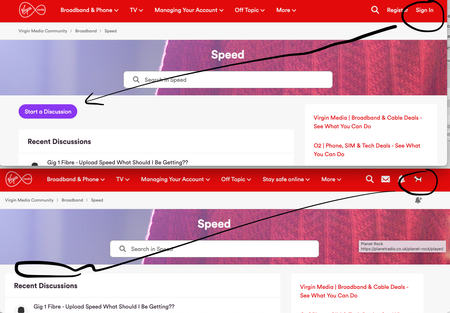
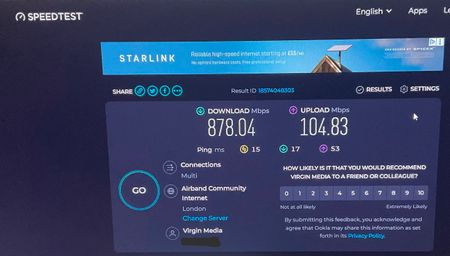
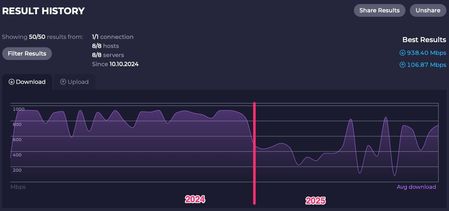
ContributionsMost RecentMost LikesSolutionsRe: Starting a discussion elsewhere same here! ws able to post in COMMUNITY NATTER but no place else, currently awaiting 'approval' ?! Have tried to create a new post in various subs on here and there is no START A DISCUSSION button?! Google searched why there was no option and found a thread that linked to Community Natter and oddly THAT forum has the option available! Then I checked what happened if I logged out and bizarrely the button appears! (see below) tried dumping cookies for Virgin site, but that hasn't solved my START A DISCUSSION issue. All i wanted to do was post to discuss why I keep getting intermittent drops out that appear to be Google DNS related and not router outages.... {sigh} whats going on {confused} can't create new posts if I'm signed in? Have tried to create a new post in various subs on here and there is no START A DISCUSSION button?! Google searched why there was no option and found a thread that linked to Community Natter and oddly THAT forum has the option available! Then I checked what happened if I logged out and bizarrely the button appears! (see below) tried dumping cookies for Virgin site, but that hasn't solved my START A DISCUSSION issue. All i wanted to do was post to discuss why I keep getting intermittent drops out that appear to be Google DNS related and not router outages.... {sigh} Anyone got a Discussion Starter solution? TIA Re: Intermittent broadband since Nov30th the 'must book' engineer came and went today, nice guy, helpful. Said everything was within spec as far as he was concerned. Could see we'd had a couple of signal spikes earlier in the week and that they could relate to the initial net drops we'd encountered since Nov 30th and the continuing VoIP echos I've had since switching to a CISCO spa 112/BT phones back in 2023. He suspects that networking has probably resolved whatever issues was causing our intermittent outages. He also said his tool was seeing good speeds. explained I suspect my browser wasn't speed testing correctly, and that I'd run a test from another PC on a seperate VLAN only this morning. Was seeing close to paid-for speeds, so I was pretty happy its all working as it should. ....as you see, 878Mbps with a listed max400Mbps firewall. This has been my experience with my last 3 Drayteks, getting way over the listed max throughputs. Re: Intermittent broadband since Nov30th cheers Adduxi, for the reply Routers been in place since 2018. From 2022-Dec 2024 I would see >900Mbps speedtest.net irrespective of the listed spec of the Firewall: Up to 400Mb/s max. Still have all the test results on a now horrid graph (what happened @ speedtest.net?) Into 2025 and my speedtest results started coming back way down and I figured something was going on in Mac/Chrome and as I was running such an old macOS I just kinda stopped testing speed regularly....other test sites gave higher results...but I digress The intermittent outage drops / VoIP fails are a new thing. Its been very wet of late so I wouldn't rule out water ingress in the street box. engineer is coming Tues (but no idea why they suggested that on the status page) but I booked it regardless I'll setup a BQM and see whats gives Thanks again ps: HA is not active (didnt even know the setting was in there) Intermittent broadband since Nov30th Hub 5 - MODEM MODE ON Hardware version 1.1 Software version LG-RDK_11.6.2-2410.1 DrayTek Vigor2862 router ethernet connected Mac GIG1 broadband (only see 500Mbps if I'm lucky for months using Chrome/Speedtest) broadband suddenly drops out immediately but immediately reconnects external VoIP service being used suddenly drops after a period of time on a call and doesn't reconnect but you can call back and its fine again for the next few calls Service status said broadband issues earlier in week and now today it told me to book an engineer, which I've done. just spent 60mins! pulling teeth with online chat trying to find out what has been going on in the area. They managed to clear security, ask what the issue was, did I use ethernet or wifi and then I gave up! 60mins to get to that part of the conversation...I could count the replies on two hands....insane Don't think I've been getting my full speed for some months, but I gave up testing as I figured my browser might be to blame and my OS was way outta date (not now) The drop out issue only started Sunday Nov 30th, noticed it on streaming radio...but figured might be the station. However using computers has highlighted that its the broadband (Macs, Windows, various VPNs etc) rebooted the perimeter router on Tuesday and its better... but speeds are way down, regardless of the tester I use. any thoughts? Virgin rep help please ...TIA Re: VM doesn't know what day of the week it is no, why would I. it said paid and I was happy to think I'd saved a months money assuming I'd advanced paid it somehow following a change in pricing recently (happens sometimes) I even went into the previous months bill to check, and all was well. Couldn't see how it had been paid but clearly it wasn't until today VM doesn't know what day of the week it is just off painful chat, may as well have been talking to the pointless bot that connected us! on THURSDAY 1ST MAY I went to the account to quickpay as I do every first of a month and it said that my bill had been paid! nothing to pay. Today I've gone to the account and it says I have an outstanding payment?! So I quickpaid it anyone in the joined-up-thinking department explain why the system got it wrong on May 1st? sudden decline in Mbps being reported by speedtest using Chrome I routinely check and record my speeds to keep an eye on what I pay for vs what I get... on average I'd say I'm around the 900Mbps mark and happy with that on a 1GB subscription. Have done this for years. ethernet connected, third party router, VM Hub 5 in modem mode But since the turn of the year it fell off the cliff....way down 😕 Initially I opened a VMchat and said my connection speed was looking slow and they said "we can see an issue with your router we'll arrange an engineer" ...the date set was the same day I had also got info they were doing works in my area midnight-3am. I also wasn't convinced the VMagent realised the Hub5 was in modem mode. However after coming off the VMchat I ran the speedtest in an alternate browser and got a VERY different result, so cancelled the engineer. Nearly double! Chrome was around the 370/98 Mbps mark, Safari 782/100 Mbps. Same computer, same ethernet connecting, two different browsers. ....to throw a huge spanner in my investigation I was on a Win11 ethernet computer in another room and Chrome gave me a result of 209/856 (yes - upload was massive compared to download 😳). But I digress. Digging a little, I'm down the rabbit hole of turning off extensions in Chrome, clearing cache, fresh profile yadda yadda but no dice. If I use Chrome I'm seeing a HUGE decline in the reported speeds Anyone else? Re: Action Not Possible CS5500 and App Not Accessible CS2400 thanks for escalating Kath_F the Youtube launch issue is not a new problem, has happened for some months now. Tried all the obvious off and on stuff, but the workaround is as above. BBC related issues seem to be littered within this forum, and as I park my box before bed on 101 and start it on 101 I guess my issues could become Beeb related. ...have to say Virgin360 has been pretty pants compared to TiVo Re: Action Not Possible CS5500 and App Not Accessible CS2400 newapollo thanks for that explanation. so although I have it 'recorded' and saved to my box it is in fact a link to iPlayer and pulls it back without the iPlayer startup graphic etc? Martin_N I can confirm it does it also from my Android Pixel 6a phone (this very morning) or my iPad Pro (usually). as above. force the casting app to close, manually launch the app via the Virgin 360 menu and then recast