uSwitch deals better than website deals
I recently ordered the m250 package for £23.99/m, however I've seen that uSwitch have the same price but for gig1, or m250 for £17.99/m or m500 for £20.99/m I ordered on the 26th, the hub 5 came on the 29th, and the engineer is due to visit on the 2nd, Is it possible to call someone and amend my order to one of those better deals, switching from sky since we have been without WiFi for the past 2 weeks Cheers343Views0likes2CommentsIntermittent broadband
Hi, I have been a VM broadband customer for many years. I am on the M350 broadband package. Over the past week I have had frequent internet dropouts spanning multiple days. Annoyingly this is happening intermittently which makes it harder to debug. There are no known broadband issues in my area. My internet can be working fine for a good few hours but suddenly I will have no internet bandwidth on my devices and I am unable to access any web pages. When this happens the connection drops for varying periods of time ranging from a few mins to sometimes as long as an hour. When I have no internet connection there doesn't appear to be any change in the status lights on the superhub. I have the superhub 5 which I upgraded to over 4 months ago and it's been working absolutely fine until last week. The superhub is running in router mode. I connect from multiple devices over wifi and there is no difference which device im using, the problem occurs on all of them. I have tried restarting the superhub many many times. Sometimes the internet comes back when the hub reboots but often it doesn't. When the internet is working I get very fast speeds: I setup a Think Broadband broadband quality monitor a few days ago. Below you can see some graphs over the past few days... Friday had no dropped packets: Saturday had some: This morning / overnight has been terrible: I would appreciate some help to try and understand what's going on here as it's been extremely disruptive especially when im working from home. Thanks in advance451Views2likes9CommentsMy Neighbour can get virgin media but I Cannot.
The title explains the bulk of my situation. After lots of complaints and problems with my current provider I searched on Uswitch to find another ISP provider and I found Virgin Media however when I tried to put in my details it was unavailable. I also tried my neighbours address at number 1 and they had it available. I have spent the past week trying to communicate to no avail, after searching for a solution online it said I could ask for a Spotter and a free home analysis I am wondering if I could get an engineer to complete this as it has been hard and confusing to find the right people at customer service to talk with so I can resolve this problem.58Views0likes1CommentVAT receipts?
I need VAT receipts for my Virgin Media invoices but there doesn't seem to be the functionality in the Billing section of my account to obtain these. I would be grateful for assistance. With thanks, [REMOVED] ChromeRadio Mod Edit : Personal information removedSolved342Views0likes12Comments
Hub 5 dropout
Afternoon, I recently contacted VM to discuss possibilty of obtaining a pod to assist an issue in 1 room of our house that has low wifi signal and they accepted that 1 was required, but as i refused to pay the £8 monthly charge (i don't agree with it), they then offered to upgrade my b/b to 1gig package and sent the new hub5. Since it has been about 10 days now, i am finding the Hub 5 keeps dropping signal in that my phone says connected to wifi but no internet access. Having used the VM Connect app, it does a test and says unable to connect to network but then it can connect instantly and says all is good. I have also noticed the wifi coverage is nowhere near as good as it should be in other areas of the house, rather than the 1 initial room that we had previously. In the room where the hub is, we have full strength wifi. Reading the forums now, it appears many other people have experienced similar issues with Hub5 so hopefully someone from VM can help here as the webchat option is waste of time in my experience. ThanksSolved309Views0likes13CommentsCOD Server Connectons Issues - AGAIN!!
Here we are again. This happened around 4/5 months ago where Virgin Media customers couldnt login to COD. This was definitely a Virgin Media issue as I could login using my neaighbours WIFI (BT) and using my phones hotspot - GiffGaff Tonight we get the same dreaded Hueneme-Negev error code. And troubleshooted using the same as above. This is definitely a Virgin Media issue again. When is Virgin going to learn from these past issues and ensure it doesnt arise again99Views0likes0Commentscan't create new posts if I'm signed in?
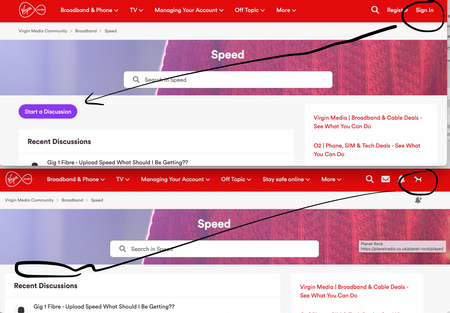
Have tried to create a new post in various subs on here and there is no START A DISCUSSION button?! Google searched why there was no option and found a thread that linked to Community Natter and oddly THAT forum has the option available! Then I checked what happened if I logged out and bizarrely the button appears! (see below) tried dumping cookies for Virgin site, but that hasn't solved my START A DISCUSSION issue. All i wanted to do was post to discuss why I keep getting intermittent drops out that appear to be Google DNS related and not router outages.... {sigh} Anyone got a Discussion Starter solution? TIA278Views0likes1CommentConnection keeps dropping Critical
Connection keeps completely dropping randomly for a minute every couple of minutes. I have turned off the router for a couple of minutes and turned it back on many times. Channel Frequency (Hz) Power (dBmV) Symbol Rate (ksps) Modulation Channel ID 1 36600000 43.3 5120 64 qam 3 2 23600000 45.8 5120 64 qam 5 3 30100000 43.3 5120 64 qam 4 4 43100000 43.3 5120 64 qam 2 5 49600000 43.3 5120 64 qam 1 Channel Channel Type T1 Timeouts T2 Timeouts T3 Timeouts T4 Timeouts 1 ATDMA 0 0 1 0 2 ATDMA 0 0 1 0 3 ATDMA 0 0 0 0 4 ATDMA 0 0 1 0 5 ATDMA 0 0 1 0 Channel Frequency (Hz) Power (dBmV) SNR (dB) Modulation Channel ID 1 387000000 5.8 40 256 qam 32 2 235000000 4.3 38 256 qam 13 3 243000000 4.3 38 256 qam 14 4 251000000 4.4 38 256 qam 15 5 259000000 4.3 40 256 qam 16 6 267000000 4.5 40 256 qam 17 7 275000000 4.1 38 256 qam 18 8 283000000 4.1 38 256 qam 19 9 291000000 4.6 40 256 qam 20 10 299000000 5 38 256 qam 21 11 307000000 5.4 40 256 qam 22 12 315000000 5.5 40 256 qam 23 13 323000000 5.8 40 256 qam 24 14 331000000 5.5 40 256 qam 25 15 339000000 5.6 40 256 qam 26 16 347000000 6.1 40 256 qam 27 17 355000000 6.1 40 256 qam 28 18 363000000 6.4 40 256 qam 29 19 371000000 6.3 40 256 qam 30 20 379000000 6.1 40 256 qam 31 21 395000000 5.8 40 256 qam 33 22 403000000 6.3 40 256 qam 34 23 411000000 6 40 256 qam 35 24 419000000 6.4 40 256 qam 36 Channel Locked Status RxMER (dB) Pre RS Errors Post RS Errors 1 Locked 40.9 2744 30382 2 Locked 38.9 728 309 3 Locked 38.6 708 178 4 Locked 38.9 775 104 5 Locked 40.3 729 99 6 Locked 40.3 721 112 7 Locked 38.9 883 153 8 Locked 38.9 974 146 9 Locked 40.3 672 152 10 Locked 38.9 684 160 11 Locked 40.3 533 213 12 Locked 40.3 562 159 13 Locked 40.3 517 140 14 Locked 40.3 601 143 15 Locked 40.9 634 175 16 Locked 40.9 564 230 17 Locked 40.3 716 214 18 Locked 40.9 624 140 19 Locked 40.9 676 110 20 Locked 40.3 789 1948 21 Locked 40.3 833 69 22 Locked 40.9 617 71 23 Locked 40.9 1077 1287 24 Locked 40.9 925 2 Time Priority Description 22/01/2026 23:33:31 notice LAN login Success;CM-MAC=**:**:**:**:**:**;CMTS-MAC=**:**:**:**:**:**;CM-QOS=1.1;CM-VER=3.0; 22/01/2026 23:33:28 Warning! LAN login FAILED : Incorrect Username / Password / ConnectionType;CM-MAC=**:**:**:**:**:**;CMTS-MAC=**:**:**:**:**:**;CM-QOS=1.1;CM-VER=3.0; 22/01/2026 21:39:15 Warning! RCS Partial Service;CM-MAC=**:**:**:**:**:**;CMTS-MAC=**:**:**:**:**:**;CM-QOS=1.1;CM-VER=3.0; 22/01/2026 17:22:21 critical SYNC Timing Synchronization failure - Loss of Sync;CM-MAC=**:**:**:**:**:**;CMTS-MAC=**:**:**:**:**:**;CM-QOS=1.1;CM-VER=3.0; 22/01/2026 16:53:17 critical No Ranging Response received - T3 time-out;CM-MAC=**:**:**:**:**:**;CMTS-MAC=**:**:**:**:**:**;CM-QOS=1.1;CM-VER=3.0; 22/01/2026 16:20:33 critical SYNC Timing Synchronization failure - Loss of Sync;CM-MAC=**:**:**:**:**:**;CMTS-MAC=**:**:**:**:**:**;CM-QOS=1.1;CM-VER=3.0; 22/01/2026 14:48:46 notice LAN login Success;CM-MAC=**:**:**:**:**:**;CMTS-MAC=**:**:**:**:**:**;CM-QOS=1.1;CM-VER=3.0; 22/01/2026 08:03:33 critical SYNC Timing Synchronization failure - Loss of Sync;CM-MAC=**:**:**:**:**:**;CMTS-MAC=**:**:**:**:**:**;CM-QOS=1.1;CM-VER=3.0; 21/01/2026 07:22:50 critical No Ranging Response received - T3 time-out;CM-MAC=**:**:**:**:**:**;CMTS-MAC=**:**:**:**:**:**;CM-QOS=1.1;CM-VER=3.0; 20/01/2026 07:06:42 critical SYNC Timing Synchronization failure - Loss of Sync;CM-MAC=**:**:**:**:**:**;CMTS-MAC=**:**:**:**:**:**;CM-QOS=1.1;CM-VER=3.0; 19/01/2026 18:27:29 notice DHCP Renew - lease parameters tftp file-cmreg-vmdg505-bbt060-b.cm modified;CM-MAC=**:**:**:**:**:**;CMTS-MAC=**:**:**:**:**:**;CM-QOS=1.1;CM-VER=3.0; 19/01/2026 18:27:29 Error DHCP RENEW WARNING - Field invalid in response v4 option;CM-MAC=**:**:**:**:**:**;CMTS-MAC=**:**:**:**:**:**;CM-QOS=1.1;CM-VER=3.0; 18/01/2026 21:16:32 critical SYNC Timing Synchronization failure - Loss of Sync;CM-MAC=**:**:**:**:**:**;CMTS-MAC=**:**:**:**:**:**;CM-QOS=1.1;CM-VER=3.0; 18/01/2026 16:08:14 critical No Ranging Response received - T3 time-out;CM-MAC=**:**:**:**:**:**;CMTS-MAC=**:**:**:**:**:**;CM-QOS=1.1;CM-VER=3.0; 17/01/2026 18:09:18 critical SYNC Timing Synchronization failure - Loss of Sync;CM-MAC=**:**:**:**:**:**;CMTS-MAC=**:**:**:**:**:**;CM-QOS=1.1;CM-VER=3.0; 17/01/2026 16:23:40 Warning! RCS Partial Service;CM-MAC=**:**:**:**:**:**;CMTS-MAC=**:**:**:**:**:**;CM-QOS=1.1;CM-VER=3.0; 16/01/2026 16:17:29 critical SYNC Timing Synchronization failure - Loss of Sync;CM-MAC=**:**:**:**:**:**;CMTS-MAC=**:**:**:**:**:**;CM-QOS=1.1;CM-VER=3.0; 16/01/2026 15:01:38 critical No Ranging Response received - T3 time-out;CM-MAC=**:**:**:**:**:**;CMTS-MAC=**:**:**:**:**:**;CM-QOS=1.1;CM-VER=3.0; 16/01/2026 14:51:46 Warning! RCS Partial Service;CM-MAC=**:**:**:**:**:**;CMTS-MAC=**:**:**:**:**:**;CM-QOS=1.1;CM-VER=3.0; 16/01/2026 07:17:46 critical SYNC Timing Synchronization failure - Loss of Sync;CM-MAC=**:**:**:**:**:**;CMTS-MAC=**:**:**:**:**:**;CM-QOS=1.1;CM-VER=3.0;76Views0likes1CommentSwitched From Sky But Still Charged For Both
When I switched from Sky in The summer I was told Virgin would inform SKY of my change of broadband but I had to tell them myself about the change of TV. I have just had a call from SKY saying they had not been informed by Virgin and so I have done so. This means that I have been double charged for 2 months for my broadband service. Who do I speak to to get this refunded. My understanding is that via the Ofcom ‘One Touch Switch’ process, Virgin are obligated to inform SKY about my switch. https://www.ofcom.org.uk/phones-and-broadband/switching-provider/easier-than-ever-to-switchSolved279Views0likes4Comments