Cannot use own Netflix account with V6 box
We have two V6 boxes, both of which are used to view Netflix via channel 204. We have a Netflix premium account used for this. We DO NOT want to link our existing Netflix account to be billed via Virgin Media. On one of our V6 boxes, we no longer have the option to logon via the Netflix app, this has only happened recently as it was working fine about a week ago. We only get the screen that forces us to link our Netflix account to Virgin Media. the other V6 box is fine and goes straight into the Netflix app when pressing the red button on channel 204. Again, we DO NOT want to link our existing Netflix premium account to Virgin Media. We simply want to logon to the Netflix app using our existing account. I have reset the box multiple times (after working out the V6 clear everything boot loop) and am still prompted to link the account. We have a Mega TV package and I am aware that Virgin offer Netflix standard as part of the package - but we do not wish to use this. The TV the box is connected to has no internet access so there is no conflict with any other Netflix app. Can anyone advise how we remove this restriction?Solved384Views0likes8CommentsStream box apps are incredibly slow
I've got 2 brand new stream boxes (Flex), one upstairs and one downstairs. Regular TV seems to work fairly well but the apps are so sluggish, it feels like the boxes are severely underpowered. Netflix especially is almost unbearable - scrolling up and down in the menu is so slow, starting a programme can take up to 30 seconds and it often takes a while for any subtitles to display. Once a programme starts playing and has buffered it works fine, but everything else is a truly miserable experience. Surely for a fairly new paid service it should work much better than this? Even the smart TV apps on my 6 year old TV aren't as painful to use as this. I am going to have to revert to using a Chromecast for apps I think because I have pretty much given up on the stream boxes now for anything other than live TV.980Views1like18CommentsNetflix Activation Not Working
I can see that this is an issue many are facing, but for the sake of kicking up as much of a fuss as possible until Virgin sort themselves out, here goes - It seems like it's not possible to activate Netflix which is included in my package. I've tried all browsers and there's no option to activate Netflix, although it did appear 1 time but then immediately errored out. I've tried calling multiple times asking for a manual link to activate Netflix but i get told a link will be sent, only to never receive anything. Since starting as a new customer over a month ago, Virgin have done nothing right, the incompetence is staggering. Why are Virgin offering incentives with no means of actually delivering? Complete scam of a service. It shouldn't be this difficult to send a bloody link.144Views0likes4CommentsMy Flex Plan: Unable to add Netflix or any other streaming services
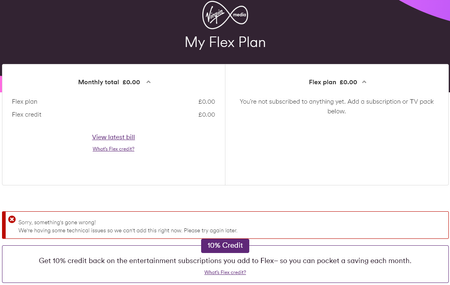
A few days ago I renewed my contract with VM. I went from 1Gig only to 1Gig plus Netflix Standard with Ads. I now have a new section in My Virgin Media called My Flex Plan which is where I believe I should be able to manage the new Netflix subscription included with my new contract: https://www.virginmedia.com/support/help/tv/streaming Unfortunately all it shows is the following error message: "Sorry, something's gone wrong! We're having some technical issues so we can't add this right now. Please try again later." Can someone from VM have a look and hopefully fix it so that I can start using the Netflix subscription? Thanks, GavinSolved1.4KViews0likes8CommentsNetflix on hold, no help when contacting virgin
I have had the ‘Virgin Media has put your Netflix subscription on a temporary hold. Please contact them directly, so you can get back to enjoying Netflix’ error message for about 3 weeks now. I have recently agreed a new contract which is the same package as my last contract which includes Netflix and I am up to date with all bills. I have tried contacting virgin numerous times on the live chat as well as phoning them, being promised reactivation links and that urgent IT tickets have been raised, but unsurprisingly it got me absolutely nowhere and I have received no replies to my correspondence. I’ve phoned Netflix who have stated this is a problem on Virgins side. Is there any way this can be resolved as it is getting incredibly frustrating trying to chase something that I am already paying for. Any help would be appreciated.229Views0likes2CommentsConstantly logging me out of on demand services
Hi ,over the last week my box has constantly been asking me to login to every on-demand service via my phone , netflix , 4od , iplayer , everytime I try to watch something on my TV . If I reboot the box then its fine for a couple of hours , but later that day the same thing will happen again , I'll have to take a photo of QR codes multiple times to watch things . If I dont it wont let me into the service or I'll get an error message saying the app is not available temporarily eg on netflix . How do I fix this please ,I tried ringing up earlier but after 20 minutes on the phone being passed from various bot to bot and not speaking to any humans whatsoever I gave up .213Views0likes4CommentsNetflix App won’t load
The Netflix app has stopped working on my box. The other apps still load okay but Netflix brings up the ‘N’ logo with the loading circle and then it won’t go any further. I can use Netflix on the TV upstairs so it’s not a Netflix or broadband issue. It just seems to be Netflix on the V6 box. I could try rebooting the box which has fixed app issues before but has also wiped my recordings at the same time so trying to keep that as a last resort.26KViews1like27CommentsIssues With Box & Remote (360 Software Download)
When I power the 360 box down with the remote red button will not power up with the remote red buttons have to a complete shut down and reboot. Box is approximately 10 years old (we got 360 later through the software download and the remote was sent to us) In addition I am having remote pairing issues. Also when trying to access Netflix through the 360m box program guide, Netflix freezes and requires reboot to reset. Have reloaded and rebooted several times, but problem still persists. Has anyone else had this issue?848Views0likes3Comments
Netflix App playback issue on TV360
I have a playback issue which affects the first minute of everything I play on the Netflix app on my TV360 boxes. After approximately the first minute of any episode or film that I play the screen goes blank and the sound drops for about 3 seconds, after which normal service is restored but the content has continued to play. If I rewind a few seconds it plays as normal. It only happens the first time that content is played after being chosen. This happens on both the main TV360 box and the second 360 box. It doesn’t happen on any other streaming apps on the TV360 boxes (Disney, Prime, etc), just Netflix. Anyone else had this issue and been able to fix it?Solved896Views0likes1Comment