Using FileZilla FTP with Hub 5x
We've just installed fibre broadband that comes with a broadband HUB 5x. It works well for general web access but not with FileZILLA for FTP connections. I just get FTP connection refused. I've been trying for 2 days now to solve the problem with firewall settings and such, but no success. Has anyone had a similar problem or can give advice. ThanksSolved334Views0likes17CommentsHub 5x Installed – No Modem Mode? What Are My Options Now?
I’ve just had Virgin Media fibre installed and I’ve been given the Hub 5x. I’ve since learned that modem mode isn’t available and it’s not possible to use my own modem/router in a proper bridge setup. For my setup this is a major issue, I run multiple VPNs, custom routing and need full control of my network. The Hub 5x in its current state is basically unusable for my needs. I’m just trying to understand what my realistic options are now: Cancel the contract and move to another provider that allows bridge mode Check if Virgin Media Business can offer a proper modem/bridge solution Or… is there any confirmed timeline for Hub 5x to support modem mode? I want to stay with Virgin if possible, but without modem mode or the ability to use my own router properly, I’m not sure what the best path is. Any guidance or official updates would be appreciated1.1KViews0likes4CommentsSeriously no modem mode for the 5x
I’m really hoping that there are some recent updates as if not it’ll mean Virgin Media are not only incompetent but are outright liars. I have just taken out their gig2 plan and I categorically asked the sales rep (who I will name if I’m allowed) whether I could run the router in modem mode. This is critical because I’m using a Firewalla Gold Pro which controls the other network from EE including failover which then leads into the eero max 7 mesh network. This means access point mode isn’t an option as I’d have to turn the Firewalla dumb which at over £750 is not something I’m willing to do especially when EE works flawlessly and as of now pretty much match virgin speeds as well. Can a virgin media engineer as a matter of urgency please provide me an update as to whether this is happening? Yes I read other posts, no I don’t care that it’s the same topic, I think it’s important to highlight that you’ll lose another new customer during the cool off period if the answer I get here is anything other than yes it’s possible or yes it’s coming imminently. Not to mention some serious complaints against the sales person who will have lied twice instead of just the one lie I’ve already caught him out on. It’s utterly ridiculous that modem mode isn’t available and even worse that Virgin continue to lie saying it is. Here is hoping there is a work around that doesn’t completely kill the benefits of my Firewalla gold pro. I was able to put the router into modem mode easily enough which is why I don’t understand why it won’t work. I have an IP address from the router and it’s connected to the 10gb port (and worked) yet all of a sudden the DNS and ping tests just totally fail. Can anyone please advise? Switching to the port 1 does nothing to fix it either2.1KViews2likes10CommentsXGS-PON FTTP Installation Issues
Hi, has anyone else who’s recently had XGS-PON FTTP installed experienced problems with the Hub 5x failing to obtain an IP address from Virgin Media’s network? My install and activation was scheduled for the 8th, but I’ve had no broadband connectivity for the last two days. An engineer came out today and attempted to escalate the issue to Virgin Media’s XGS-PON technical team. We’re the first household in my area to switch to Virgin Media. It’s a nexfibre build location where VM are the only FTTP provider. The engineer suspects that either being one of the first customers in the area, or being the only connection on the underground distribution unit, might be contributing to the issue. VM are currently investigating and have asked me to wait another 48 hours. Has anyone else run into something similar with their installation? p.s I had a look on the routers information page, it shows that the IPv4 lease time it obtains upon booting is set to one hour in the past, I wonder if this has anything to do with the issue.168Views0likes2CommentsHub5x Latest Firmware 7.8.3-2410.5
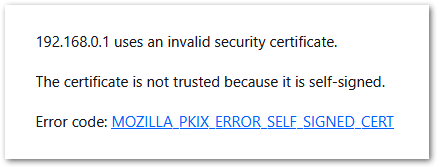
Yesterday my Hub5x updated it's firmware to 7.8.3-2410.5 Issues #1 Connecting to the router After this I have noticed that FireFox permamantly complains that my connection to the router (http://192.168.0.1 which FF redirects to https://192.168.0.1) is not secure. Warning me that it is a self signed certificate. I have clicked on "Accept this risk and Continue", but I still get warnings every time I want to connect to the router. #2 IPv6 I notice that Network Status -> Network log is now being spammed with a new message "erouter0 ipv6 address is empty" When will IPv6 be properly supported? /Mike Williams816Views1like12CommentsHub 5x Outage and Firmware Update
Further to previous posts So my Internet only works in DMZ or wih a VPN Without those on Ive run a Ping Test for 5 Min I get spike readings of up to 8000 on a ping Test but settles down to under 20 but seems to go above 500 every min or so Then used another testing site and got this I had no issues until Outage last wednesday and then a firmware update Virgin not helping say resolved but keep probing say relate to outage Total packets Sent: 2620, Received: 319 Call Quality Estimation: Overall estimated call quality score based on round trip delay, jitter, and packet loss rate. 4.5: Excellent (Imperceptible) 4.0: Good (Perceptible but not annoying) 3.0: Fair (Slightly annoying) 2.0: Poor (Annoying) 1.0: Bad (Very Annoying) Your Results: Average Score: 1.18, Minimum Score: 1.00 Packet Loss Rate(%): Packet loss happens when a packet does not arrive, arrives out of order, or arrives too late. > 10.0: Might cause frozen video and broken audio. >= 2.0: Might cause low video FPS, and audio quality might be affected. < 2.0: Video/Audio quality will not be affected. Your Results: Average Loss(%): 91.46, Highest Loss(%): 100.00 Average Round Trip Time(ms): Time it took to send a packet to the server and receive it back. > 300: Might cause unnatural delays in an audio conversation and disconnect between audio and video. Your Results: Average Delay(ms): 2.25, Max Delay(ms): 23.00348Views0likes12CommentsHub 5x Modem Mode
OK Virgin! Please.. I need someone to confirm if Modem Mode is coming soon? I just got installed yesterday, I'm on 1GB Full Fibre and based in Ireland. I've spent a considerable amount of time researching online around this topic and it doesn't look like using your own network equipment is possible... there's so many people crying out for this feature and I just want someone from Virgin to confirm here if its coming or not. I already got IPv4 enabled, as a work around I can double NAT and that works, however the speed is reduced.. but also.. I really dont want to double NAT either. Thanks781Views0likes22CommentsVM Hub 5x flashing red light
Had 1 gig fibre for a few months now, every now and again the internet goes down and a reset normally fixes it. Came home from work to no internet and the hub flashing red, and after 4 hours of messing with it, I'm still without any connection. Followed the guidance through through the my VM app, and ended up stuck in a loop where it said my Hub wasn't connected correctly, so I would carry out the steps it said, only to be told it wasn't connected correctly and to do it all again - I foolishly did this 4 times... to no avail. Tried ringing customer service on 3 occasions, ended up stuck in a loop again, with the automated service saying the same thing over and over, saying I'll get a message if I have any more problems - I never did. Opened various chats in the 'message us' section, no one ever responded. Sent in a WhatsApp, no one responded. It's almost like VM don't want their paying customers contacting them, and make it impossible to do so. So now I'm stuck with no internet, having only gone with VM for quicker connection for Sky Glass, and I work from home a lot too. Firstly, send an engineer to fix my internet, and secondly, make it easier for customers to contact you in times of need please VM. Matt.173Views0likes2CommentsWiFi Pod not connected to new Hub 5x
Hello, We had a "health check" engineer visit yesterday, and one of the things he did was switch our Hub 5 for a Hub 5x. Everything's good, except our WiFi Pod which does not seem to be connected to the new Hub. It is displayed as Offline in the Virgin Media Connect app, but instructing it to reboot through the app seems to work. Could we get the WiFi pod updated to work with the new Hub please?Solved382Views0likes5CommentsModem Mode stopped working since Tuesday's outage (Hub 5x)
I managed to painstakingly get it to work a few weeks ago with my Unifi Express 7 but last night after a brief outage it has stopped passing a WAN IP to the Unifi Router. I've spent hours and hours trying every variant of the Reddit threads and forum posts on how to enable it and it WILL NOT for the life of me pass an IP Address to the WAN Port once it's in Modem Mode. What I did last time was the following: Connect the Unifi Router to Hub Port 1. Connected to the Hub portal 192.168.0.1 via a laptop connected to the Unifi Router LAN. Disabled DMZ, WiFi, Firewall, UPnP and DHCP. When I disable DHCP it annoyingly drops the lease on the Unifi Router so I then have to connect my laptop directly to the 10gig service port on the Hub and change its IP to be under the 192.168.0.x subnet. I know of no other way to connect to it (other than forcing a static internal IP on the Unifi WAN port which also fails). Enable Modem Mode and unplug the laptop from the service port before it reboots. Not sure if the laptop unplugging is what made it work but I've tried both removing and leaving it in today. Power Cycle the Hub after it reconfigures. I am completely lost and it has failed constantly the last few days.314Views0likes7Comments