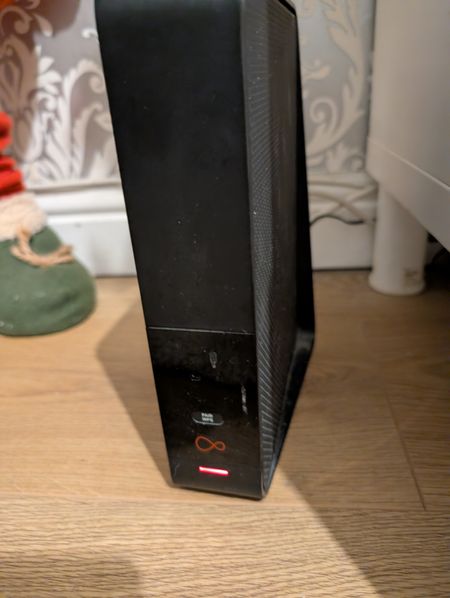
Solid red LED on Hub 3.0
I have a hub 3.0 which is showing a solid red LED. Looking this up online indicates the Hub is overheating. It’s warm on top but I wouldn’t say it’s hot. It sits on an open shelf, out of the sunlight with space on either side. The hub is in router mode. Following the advice on the website I’ve switched it off for 20 minutes but the LED stayed solid red after powering it back up. I’ve tried resetting it to factory settings with the same result. Can someone from the Forum team please contact me to arrange a replacement hub. I am happy to install the hub myself without the need for a technician visit.Solved156Views0likes6Comments
Complete loss of service - Tracking progress?
Does anyone know of a solid way to track progress on an issue? My internet has been out since Sunday afternoon, I can see in the network logs that there's an issue with the termination service, mac address isn't coming back with anything. Reported issue Monday morning, was told engineer was coming out Tuesday but that was a no show, chased this. Rescheduled on Wednesday, who popped over to say that he's seen, and checked with a outside cable engineer, looking at an issue. Had to follow up that night, because I'm still in the dark about it all, was told that there's an issue with the 'pit chamber' (hole under the junction box?), and it would be sorted by Thursday 7pm... It wasn't; Long discussion with support last night who explained the issue further, saying there was a blockage etc.. and it will be resolved in the next 72 hours... Now I don't mind, and appreciate that it can take time to sort, but there's been no real updates throughout, only a text to say an engineer is scheduled, and only when i contact support. The area service checker says everything is fine and dandy, so my wife and I have been tethered to my phone to work for the last 5 days, and I've had no messages/texts/emails since, to say what is happening. Support have been really polite and helpful, but I feel like they're slightly disjointed from what's happening on the ground? it'll be good to have an engineer give me a explanation of the issue and how it will be resolved, if there are difficulties and an ETA. AdamSolved77Views0likes1Comment
Hub 3 red light on
The red light on my hub stays red all the time despite switching off and on numerous times in the last month. I still have working wifi, phone and Virgin TV. I have factory reset the hub, checked cables etc and hub temperature but still red. When I run diagnostics for the hub it says all OK. I am in router mode. When I do a status check on MyVirginMedia website it usually says unable to connect to your hub. Is there anythingelse I can check?Solved825Views0likes25CommentsSolid redline on my hub3
Hi just out of nowhere my router has stopped working with only a solid red line from what I have read it’s over heating however it doesn’t feel hot to the touch I did however turn it of for 15 mins with no change so i did factory reset still nothing it come back online for 1 min then back to nothing how do I go about swooping it out for a replacement? Cheers phill85Views0likes2CommentsReally worried about my Hub 3, red light, slow and overheating
Hi everyone, I'm looking for some help with my Hub 3. I’ve noticed the light on the front has turned a solid red color and the whole thing is actually hot to the touch. I did a bit of searching on here and it looks like this is an overheat warning? It’s pretty concerning as it’s sitting right near my TV and I’m worried about it being a fire risk, so I’ve had to unplug it for now. I’ve tried the pinhole reset but the red light just comes back on after a few minutes. On top of that, the Wi-Fi has been terrible for a long time. Pages just hang forever before loading and online calls lag to the point of disconnection, even though I'm on the M350 plan and even in the same room. I’ve been a customer for a long time but honestly, between the safety worry and the bad connection, I’ve started looking at Sky. I’d much rather just get this fixed, though. I know there’s a rollout for the Hub 5 happening now for people with older Hubs. Is there any way a staff member could help me get one sent out? I really don't want to go back to another Hub 3 if this one is already failing like this. Thanks in advance for the help!118Views0likes2Comments
Broadband outage since 20.11.25 in HX7 - any insiders know why?
I’m in West Yorkshire (hX7) and my broadband has now been down since 20th November due to an outage in our area. Virgin Media keeps giving me daily “it’ll be fixed by X time” estimates, but every time the deadline passes the fix time just gets pushed back again. I finally got a fault reference (F012083365), but the automated text updates are now giving me completely unrealistic placeholder repair dates like 29/11/2025 and 01/12/2025, which obviously aren’t genuine engineer estimates. It feels like the system is just looping without any real update or engineer activity. I’ve spoken to WhatsApp support, web chat, and phone support, but I keep getting copy-paste answers like “an engineer is on their way” or “external damage by a foreign element,” with no actual detail about what’s happening or when it will realistically be resolved. Is anyone else in the area experiencing the same outage? Or does anyone here who works/has worked for Virgin Media know what this usually means? Is this the kind of long-term fault where they’re waiting on contractors or permits, or is it more likely that the job is stuck in their system? Any insight would be massively appreciated the lack of real communication is the most frustrating part.121Views0likes3CommentsRed light on hub
Hiya I’ve got a red light on my hub which no matter what I do won’t go away. I’m not sure if it’s impacting my WiFi as my connection keeps dropping when I’m on teams calls. I’ve done tests which says I should have a virgin wifi pod but I cannot find a way to order them anywhere. Any ideas? Thanks98Views0likes3CommentsConstant red light on Hub
The red light on my hub stays red all the time despite switching off. I still have working WiFi and Virgin TV. I have factory reset the hub, checked cables etc. and hub temperature but still red. I’ve read a few other threads and people are suggesting I need a replacement? Thanks59Views0likes2CommentsVirgin media broadband outage GU14
Hello Virgin media has and outage since roughly Monday 22nd Sept in the GU14 area. Thursday 25th we were informed it was fixed. Everysince the fix we the Superhub switches to either flashing green or flashing red and the internet dropping out for most of the day until circa 7pm. Then working flawlessly in until the next morning until it cuts out at 9ish. I can only assume Can I get a bit more information on what is happening in the GU14 area - it seems the outage hasn't been totally resolved and there is work continuing. customer service doesn't really give much info apart from booking a technician and I can't see anything on status updates as it just states "you have a technician booked" Any help is my much appreciated as this issue is really driving us bonkers! Thank you115Views0likes5Comments
Red light on hub three
Hello there, I wonder if anyone can help. I have a three router and I am continually having to turn the power off and allow it to cool down. It has a red light on constantly. I have performed all the instructions that I have come across in previous post and had a chat with one of the virgin representatives. This is included doing a hard reset and a pinhole push for 30 seconds. I find this sometimes resolves the problem for a number of days and then it repeats the same issue and the Wi-Fi drops. The router is well ventilated and vertical but has a constant red light on it is not particularly hot to touch. Any advice or direct message from virgin media representative would be greatly appreciated. Looking on previous posts of the same manner it seems the hub may be faulty and require replacement. Many thanks86Views0likes2Comments