Hub 5 Stats and Levels - potential issues?
I’m looking for some advice and, if it warrants, an engineer visit, as my Hub 5 stats suggest an ongoing downstream DOCSIS 3.1 issue. Background I moved into this property about a year ago and brought my Virgin Media service with me from my previous house. During renovation work, my builder offered to run some NX100 coax that I had previously used to extend Sky Q cabling. This was run under the floor and terminated with compression connectors, so I could locate my Hub 5 in an under-stairs cupboard. At the time, I didn’t think much of it. My setup Hub 5 in modem mode OPNsense router with VLAN separation 24 port managed switch Ceiling mounted AP upstairs Over time, I’ve had repeated issues with Sky Stream boxes, including slow channel loading and general instability, which led to multiple replacement boxes. That made me start looking more closely at the Virgin Media connection rather than the Sky hardware. After checking the web and forums, I realised that extending the internal coax like this isn’t officially supported, as Virgin use specific cable and connectors to maintain signal quality and could be the reason for my sky issues. Current cabling layout The Virgin feed into the house is split externally. One leg goes into the living room (this is the run that was extended internally using the NX100 cable). Another leg runs around the front, side, and back of the house, then splits again to feed the two rear bedrooms. To rule out the internal extension, I’ve now moved the Hub 5 upstairs and connected it directly to the original outlet there. I’m using Cat6a throughout the house, so router location isn’t an issue. Since doing this, the connection does feel more stable. This might be placebo, but I’m seeing fewer post RS errors than when the hub was downstairs. That said, the downstream DOCSIS 3.1 channel still appears to be struggling, and upstream power levels are on the high side. Hub details Hub 5 Uptime: ~4.5 days Issue observed The DOCSIS 3.1 downstream OFDM channel is showing extremely high uncorrectable error counts over a relatively short uptime. DOCSIS 3.0 channels look broadly healthy by comparison. Correct me if I'm wrong but from what I understand, this OFDM channel carries most of the traffic on a 500 Mb service, so this would explain intermittent performance issues even when speed tests sometimes look acceptable. I’ve now removed the non-standard internal coax run from the equation, but the error rate suggests there may still be a signal or noise issue either on the external cabling, splitter configuration, or at the cabinet. I’ve pasted my full downstream and upstream stats below. Modem stats 3.0 Downstream channels Channel Frequency (Hz) Power (dBmV) SNR (dB) Modulation Channel ID 1 515000000 -5.4 38 QAM 256 48 2 139000000 0.6 39 QAM 256 1 3 163000000 0.8 38 QAM 256 4 4 171000000 -2.2 39 QAM 256 5 5 195000000 -3.2 39 QAM 256 8 6 203000000 -2.2 39 QAM 256 9 7 227000000 -2.9 39 QAM 256 12 8 235000000 -3.5 39 QAM 256 13 9 259000000 -3.9 39 QAM 256 16 10 267000000 -3.8 39 QAM 256 17 11 275000000 -3.1 39 QAM 256 18 12 283000000 -3.0 39 QAM 256 19 13 307000000 -3.2 39 QAM 256 22 14 315000000 -3.7 39 QAM 256 23 15 339000000 -4.2 39 QAM 256 26 16 347000000 -3.4 39 QAM 256 27 17 371000000 -3.6 39 QAM 256 30 18 379000000 -4.7 39 QAM 256 31 19 403000000 -5.3 38 QAM 256 34 20 411000000 -5.3 38 QAM 256 35 21 419000000 -4.7 38 QAM 256 36 22 427000000 -5.6 38 QAM 256 37 23 435000000 -5.6 38 QAM 256 38 24 443000000 -4.7 38 QAM 256 39 25 451000000 -5.7 38 QAM 256 40 26 459000000 -5.8 38 QAM 256 41 27 467000000 -5.2 38 QAM 256 42 28 475000000 -5.8 38 QAM 256 43 29 483000000 -5.6 38 QAM 256 44 30 491000000 -5.3 38 QAM 256 45 31 499000000 -5.9 38 QAM 256 46 32 507000000 -6.0 38 QAM 256 47 Channel Locked RxMER Pre RS Errors Post RS Errors 1 Locked 38 152336 216 2 Locked 39 1984722 246752 3 Locked 38 1503549 36867 4 Locked 39 2511397 309765 5 Locked 39 29896 3641 6 Locked 39 13719 1521 7 Locked 39 11052 1702 8 Locked 39 11813 914 9 Locked 39 7555 1156 10 Locked 39 7360 1034 11 Locked 39 9674 862 12 Locked 39 15196 1574 13 Locked 39 21596 2291 14 Locked 39 7633 848 15 Locked 39 2701 219 16 Locked 39 2544 350 17 Locked 39 4043 693 18 Locked 39 5688 240 19 Locked 38 22827 429 20 Locked 38 28284 544 21 Locked 38 34259 279 22 Locked 38 33851 217 23 Locked 38 33658 157 24 Locked 38 40376 430 25 Locked 38 47853 417 26 Locked 38 59408 344 27 Locked 38 72374 159 28 Locked 38 76705 249 29 Locked 38 89224 356 30 Locked 38 92496 342 31 Locked 38 100102 57 32 Locked 38 129376 111 3.1 Downstream channels Channel Width (MHz) FFT Active Subcarriers Modulation First Subcarrier (Hz) 159 94 4K 1840 QAM 4096 1108 Channel Locked RxMER PLC Power (dBmV) Corrected Errors Uncorrectable Errors 159 Locked 0 -11.9 72588512 1870611403 3.0 Upstream channels Channel Frequency (Hz) Power (dBmV) Symbol Rate Modulation Channel ID 0 49600000 51.3 5120 QAM 64 9 1 43100000 50.0 5120 QAM 64 10 2 36600000 52.0 5120 QAM 64 11 3 30100000 51.0 5120 QAM 64 12 4 23600000 50.3 5120 QAM 64 13 3.1 Upstream channels Channel Width (MHz) Power (dBmV) FFT Modulation 14 10 44.7 2K QAM 256 I’d appreciate someone from Virgin Media taking a look and, if needed, arranging an engineer visit to properly check signal levels, splitters, and the DOCSIS 3.1 downstream path.403Views0likes12CommentsWiFi speed expectations - 1/3 of the speed
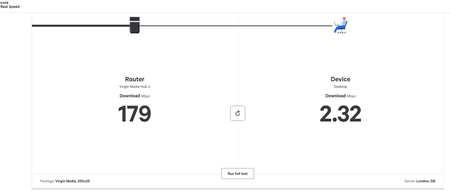
Hi All, Just had a problem with my Hub fixed and now have a Hub 5 all working. Engineer said I wasn't getting full 1gb internet speeds but it should improve. I've just checked and I'm getting around 200 this morning, got about 330 yesterday evening. What could be the cause? Any ideas on how to fix?312Views0likes23CommentsBroadband Outage - Partial Services (DS Only)
My broadband has been dropping out since Thursday. Virgin flagged the issue that same day and the service status on my account was updated, but the fix date keeps shifting. It seems it was area wide. It was meant to be sorted Friday morning and has now moved to Monday 24 November. My Hub 5 is in modem mode, and I’ve rebooted it, powered it off, and tried every usual step. Nothing changes. The connection still cuts out without warning. Speed is around 180-230mbps when I should be getting 500mbps. There are loads of pre and post RS errors on the downstream channels. On the home page of the modem the internet status says Partial Service (DS Only) in red. I work from home, so this has caused a real mess. Sky Stream keeps freezing, and things got so unreliable that I’ve ended up staying at my in-laws over the weekend just to get work done. They’re on Virgin too, and their speed is completely fine, which makes the whole situation even more confusing. Can someone explain what’s going on with this fault, why the fix date keeps slipping, and whether anything can be done in the meantime to keep the line steady?216Views0likes3CommentsVodafone 6e
I have issues with my WiFi speeds, there's another really long post about this on here, but I can't get any help that improves my issue. My question is could I buy a 2nd hand Vodafone 6e router and put my hub 5 in modem mode and use it? Will it work? My WiFi is severely congested due to neighbour having lots and lots of cameras, access points etc. Anyone have any experience using the Vodafone 6e router in this way with Virgin? I'm desperate, I've tried everything else and had multiple engineers visit505Views0likes21CommentsExtending Range to Garden Office
I've got a definite dip in Wifi speed in my garden office (about 5m away from the house - on the other side of the wall where my hub 5 lives) Both house and office are very well insulated House speeds showing as 380+, office speed between 9 and 30 with a great deal of variation throughout the day. Measured on Speedchecker I can't use the Wifi Home Scan - it times out regardless of when and which room I try, I get an Oops try again later message. (have tried deleting the app etc but to no avail) I think I might be able to use a Wifi Pod to sort this out, but am in a catch 22 as I can't do the scan to show the speeds. First question - How can I order one if I can't do the scan? Prior to joining VM my router was under the stairs connected to the office via an ethernet cable which now sits unused as VM couldn't fit the hub5 in the same place, so it's situated in the living room. Additional question - Is there another way to utilise the ethernet cable to help, given that it's miles away from the router? Any help would be greatly appreciated and possibly save my marriage as Mrs is sick of me working in the kitchen....196Views0likes8CommentsNot getting no were near the amount of MBPS i am meant to get
So recently noticed when i have been downloading games etc on my PC i have been getting roughly 8MBPS, i am paying for M250 Which says i should receive around that, but im getting no were near that.. Im running wired not wireless so should have quicker speeds110Views0likes5CommentsFrustrated with low speeds :-(
Hello due to my circumstances I am on the Essentials package and have had nothing but trouble with it Signal keeps dropping and today they said there's an intermittent fault they are working on and I had no signal at all for a while I am a Grandmother who is raising her teenage Grandson with Autism on her own He NEEDS to be connected to the internet for his well being as even at 18 he watches Cbeebies and his favourite music video's as his mental age is around 6 and he has limited speech I need the internet too as everything is done online and I need it to work! I also do not drive so shopping online is essential My area seems to suffer a lot of internet issues and only an O2 mobile signal ( just about ) works in this area , NO other mobile provider signal and we are not even out in the sticks , but almost! I am thinking of UPGRADING to a Volt internet package if possible as I am on a basic £8 a month O2 mobile contract I tried ringing VM today but I was too late ( after 6pm ) but this LOW signal is getting me down now and big man get's distressed when we LOSE signal completely like today or it goes super slow etc!! :-( It took me 2 hours yesterday to do a simple Just Eat grocery shop for essentials as it was SO slow indeed! I have had so many promises from VM over the years , am told to reset router etc but nothing helps and I was wondering if I change the package to the VOLT M250 which is only £3.99 more than what I am paying would it actually make a difference in having good internet connection over poor connection and speeds please? It seems to be the actual connection which is poor and intermittent rather than the speed being the issue? Which worries me I tried the pods but they did absolutely nothing at all!! I do currently just have the 54Mbps package ( the highest Mbps on the Essentials social tariff ) and on the Volt package it is 264Mbps for their most inexpensive package I don't suppose we would get a new router with the switch? My concern is this one is around 3-4 years old Also my concern is if I get hooked into the Volt 24 month contract and the signal is still rubbish I am STUCK and cannot leave! :-( :-( I am SO unsure as what to do and any advice would help please??Solved161Views0likes4Comments
Slow decline in Gig1 speeds and now getting <565 Mbps - the minimum download speed
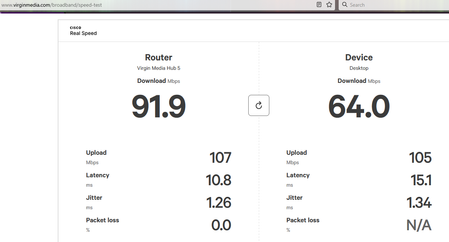
Besides complaining to Virgin Media, is there anything I can do? Here's proof from Virgin Media's own speedtest: Here's a typical speedtest.net result: Here's data over the past month showing a slow decline in speed (a raspberry pi runs a speedtest every couple of hours): Normally the speeds max out the 1 GB/s network interface, here's data going back a year: I rebooted the router at the end of July (no change to speed) and rebooted again at the start of September when I noticed the speeds dropping. I have tested the speed on my main computer, directly cabled into the router, and on two separate raspberry pis (a 4 and a 5) with CAT6 cable. There is nothing untoward in the router logs, these are the only critical entries: [Mod - MAC addresses images removed] Thanks for any advice you can offer to help diagnose/fix this issue.376Views0likes16CommentsVirgin what have you done - Hub 5X
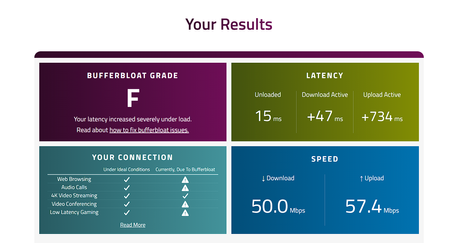
My Internet never best but could handle Teams and Roblox and didnt Buffer and i could download Last Wednesday Outage Last Thursday Firmware Update Since been awful Virgin say is a problem and then say all resolved , spent hours on chats , emailed CEO , log a complaint they close it :(174Views0likes3Comments