Intermittent broadband
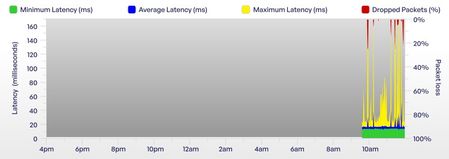
Hi, I have been a VM broadband customer for many years. I am on the M350 broadband package. Over the past week I have had frequent internet dropouts spanning multiple days. Annoyingly this is happening intermittently which makes it harder to debug. There are no known broadband issues in my area. My internet can be working fine for a good few hours but suddenly I will have no internet bandwidth on my devices and I am unable to access any web pages. When this happens the connection drops for varying periods of time ranging from a few mins to sometimes as long as an hour. When I have no internet connection there doesn't appear to be any change in the status lights on the superhub. I have the superhub 5 which I upgraded to over 4 months ago and it's been working absolutely fine until last week. The superhub is running in router mode. I connect from multiple devices over wifi and there is no difference which device im using, the problem occurs on all of them. I have tried restarting the superhub many many times. Sometimes the internet comes back when the hub reboots but often it doesn't. When the internet is working I get very fast speeds: I setup a Think Broadband broadband quality monitor a few days ago. Below you can see some graphs over the past few days... Friday had no dropped packets: Saturday had some: This morning / overnight has been terrible: I would appreciate some help to try and understand what's going on here as it's been extremely disruptive especially when im working from home. Thanks in advance504Views2likes9CommentsTotal loss of service, how long till the cable pull
We've had a total loss of service since 19th November, when Surrey Highways dug up the pavement and dislodged a previous repair to our cable. No one else in the street was affected. Since then we have had various engineers out and finally someone has repaired the outer cable sheath and removed the old cable, but we have been waiting for a cable pull ever since (since early December). Obviously speaking to customer service, they assure me that a team will be out to fix it tomorrow and they will be on site from 8am to 7pm. From previous messages here, I can see that is a load of rubbish. Basically I just want to be able to speak to someone who can tell me an approximate date that this repair will be completed. We already have a formal complaint (last contact from VM by letter, they said a team would be out to do the cable pull on Christmas Eve! We have replied twice, but it hasn't been acknowledged yet). Automatic compensation is being applied to our account, we just need an end date because running off mobile data is not fast!Connection keeps dropping Critical
Connection keeps completely dropping randomly for a minute every couple of minutes. I have turned off the router for a couple of minutes and turned it back on many times. ChannelFrequency (Hz)Power (dBmV)Symbol Rate (ksps)ModulationChannel ID13660000043.3512064 qam322360000045.8512064 qam533010000043.3512064 qam444310000043.3512064 qam254960000043.3512064 qam1 ChannelChannel TypeT1 TimeoutsT2 TimeoutsT3 TimeoutsT4 Timeouts1ATDMA00102ATDMA00103ATDMA00004ATDMA00105ATDMA0010 ChannelFrequency (Hz)Power (dBmV)SNR (dB)ModulationChannel ID13870000005.840256 qam3222350000004.338256 qam1332430000004.338256 qam1442510000004.438256 qam1552590000004.340256 qam1662670000004.540256 qam1772750000004.138256 qam1882830000004.138256 qam1992910000004.640256 qam2010299000000538256 qam21113070000005.440256 qam22123150000005.540256 qam23133230000005.840256 qam24143310000005.540256 qam25153390000005.640256 qam26163470000006.140256 qam27173550000006.140256 qam28183630000006.440256 qam29193710000006.340256 qam30203790000006.140256 qam31213950000005.840256 qam33224030000006.340256 qam3423411000000640256 qam35244190000006.440256 qam36 ChannelLocked StatusRxMER (dB)Pre RS ErrorsPost RS Errors1Locked40.92744303822Locked38.97283093Locked38.67081784Locked38.97751045Locked40.3729996Locked40.37211127Locked38.98831538Locked38.99741469Locked40.367215210Locked38.968416011Locked40.353321312Locked40.356215913Locked40.351714014Locked40.360114315Locked40.963417516Locked40.956423017Locked40.371621418Locked40.962414019Locked40.967611020Locked40.3789194821Locked40.38336922Locked40.96177123Locked40.91077128724Locked40.99252 Time Priority Description 22/01/2026 23:33:31 notice LAN login Success;CM-MAC=**:**:**:**:**:**;CMTS-MAC=**:**:**:**:**:**;CM-QOS=1.1;CM-VER=3.0; 22/01/2026 23:33:28 Warning! LAN login FAILED : Incorrect Username / Password / ConnectionType;CM-MAC=**:**:**:**:**:**;CMTS-MAC=**:**:**:**:**:**;CM-QOS=1.1;CM-VER=3.0; 22/01/2026 21:39:15 Warning! RCS Partial Service;CM-MAC=**:**:**:**:**:**;CMTS-MAC=**:**:**:**:**:**;CM-QOS=1.1;CM-VER=3.0; 22/01/2026 17:22:21 critical SYNC Timing Synchronization failure - Loss of Sync;CM-MAC=**:**:**:**:**:**;CMTS-MAC=**:**:**:**:**:**;CM-QOS=1.1;CM-VER=3.0; 22/01/2026 16:53:17 critical No Ranging Response received - T3 time-out;CM-MAC=**:**:**:**:**:**;CMTS-MAC=**:**:**:**:**:**;CM-QOS=1.1;CM-VER=3.0; 22/01/2026 16:20:33 critical SYNC Timing Synchronization failure - Loss of Sync;CM-MAC=**:**:**:**:**:**;CMTS-MAC=**:**:**:**:**:**;CM-QOS=1.1;CM-VER=3.0; 22/01/2026 14:48:46 notice LAN login Success;CM-MAC=**:**:**:**:**:**;CMTS-MAC=**:**:**:**:**:**;CM-QOS=1.1;CM-VER=3.0; 22/01/2026 08:03:33 critical SYNC Timing Synchronization failure - Loss of Sync;CM-MAC=**:**:**:**:**:**;CMTS-MAC=**:**:**:**:**:**;CM-QOS=1.1;CM-VER=3.0; 21/01/2026 07:22:50 critical No Ranging Response received - T3 time-out;CM-MAC=**:**:**:**:**:**;CMTS-MAC=**:**:**:**:**:**;CM-QOS=1.1;CM-VER=3.0; 20/01/2026 07:06:42 critical SYNC Timing Synchronization failure - Loss of Sync;CM-MAC=**:**:**:**:**:**;CMTS-MAC=**:**:**:**:**:**;CM-QOS=1.1;CM-VER=3.0; 19/01/2026 18:27:29 notice DHCP Renew - lease parameters tftp file-cmreg-vmdg505-bbt060-b.cm modified;CM-MAC=**:**:**:**:**:**;CMTS-MAC=**:**:**:**:**:**;CM-QOS=1.1;CM-VER=3.0; 19/01/2026 18:27:29 Error DHCP RENEW WARNING - Field invalid in response v4 option;CM-MAC=**:**:**:**:**:**;CMTS-MAC=**:**:**:**:**:**;CM-QOS=1.1;CM-VER=3.0; 18/01/2026 21:16:32 critical SYNC Timing Synchronization failure - Loss of Sync;CM-MAC=**:**:**:**:**:**;CMTS-MAC=**:**:**:**:**:**;CM-QOS=1.1;CM-VER=3.0; 18/01/2026 16:08:14 critical No Ranging Response received - T3 time-out;CM-MAC=**:**:**:**:**:**;CMTS-MAC=**:**:**:**:**:**;CM-QOS=1.1;CM-VER=3.0; 17/01/2026 18:09:18 critical SYNC Timing Synchronization failure - Loss of Sync;CM-MAC=**:**:**:**:**:**;CMTS-MAC=**:**:**:**:**:**;CM-QOS=1.1;CM-VER=3.0; 17/01/2026 16:23:40 Warning! RCS Partial Service;CM-MAC=**:**:**:**:**:**;CMTS-MAC=**:**:**:**:**:**;CM-QOS=1.1;CM-VER=3.0; 16/01/2026 16:17:29 critical SYNC Timing Synchronization failure - Loss of Sync;CM-MAC=**:**:**:**:**:**;CMTS-MAC=**:**:**:**:**:**;CM-QOS=1.1;CM-VER=3.0; 16/01/2026 15:01:38 critical No Ranging Response received - T3 time-out;CM-MAC=**:**:**:**:**:**;CMTS-MAC=**:**:**:**:**:**;CM-QOS=1.1;CM-VER=3.0; 16/01/2026 14:51:46 Warning! RCS Partial Service;CM-MAC=**:**:**:**:**:**;CMTS-MAC=**:**:**:**:**:**;CM-QOS=1.1;CM-VER=3.0; 16/01/2026 07:17:46 critical SYNC Timing Synchronization failure - Loss of Sync;CM-MAC=**:**:**:**:**:**;CMTS-MAC=**:**:**:**:**:**;CM-QOS=1.1;CM-VER=3.0;86Views0likes1CommentJunction cabinet in my hedge
Virgin Media applied to the local highways agency to replace a 85cm high cabinet on the highway outside my house in 2023. They actually put a replacement 1.2m high by 1.2m wide cabinet in my hedge, next to my drive. Earlier this year they dug up my hedge looking for cables under the cabinet and the hedge is now wrecked. I can’t replace it with a fence because the cabinet is in the way. I’ve tried complaining but four months later I’m just being fobbed off with excuses or promised callbacks which don’t materialise. I want to escalate the complaint but am not sure where to go. Is it Ofcom or the Communications Ombudsman?642Views0likes28CommentsDiversity in Virgin Media Engineering team
We had issues with our WiFi when we first set up the Virgin Media router. Engineer Louise (62290) visited our home, and she was absolutely fantastic. She carefully identified the problem inside the house and then went on to fix the cabling in the street cabinet. Louise was incredibly knowledgeable and genuinely committed to ensuring that every part of our home had strong WiFi coverage — and she succeeded. It was also wonderful to see a female engineer representing Virgin Media. As a woman working in software development, I know what it’s like to be in a male‑dominated environment, so being supported by the brilliant Louise 62290 was especially meaningful. Her professionalism and dedication truly made a difference.Connection time-outs every now and then
Hello, My connection is getting annoying time-outs. For several years my connection was stable, but since 4-6 weeks the connection cuts off for 5-60 seconds every 5-90 minutes. Quite random, as you can see. Hub 3 I did all sorts of reboots, resets, cable checks, modem placements and anything I can think of. Happens on all devices at the same time. It goes on like that. The graph doesn't really paint the full picture. I don't notice the yellow spikes, but the red spikes should be 100%. This here is more accurate. Fine most of the time, but then random time-out. Power levels: ~+2 to +3.5 dBmV across all channels. Fine. SNR / MER: ~38–41 dB. Also fine. Post-RS errors are non-zero and fairly high on all channels. Not fine. The network log has it's fair share of Timing Synchronization failure and RCS Partial Service. Sounds like a bad splitter (I don't have one), bad cabling or a return-path issue only Virgin can fix. The outside of the house looks like this, openly at the street (quality work): Any drunk vandal could just pull on them. Then again the cables have looked like this for years. What do?All surrounding streets have Virgin Media with FTTP except mine
Hello! I live in London, and I have been waiting for fibre for several years. I have checked the fibre rollout map and it looks like in my area, Virgin Media is the only provider available for FTTP, openreach has plans to build but the entire area does not have openreach at all. I currently have FTTC (fibre to the cabinet) with BT but I have not renewed contract in the hopes that I would get fibre by 2026. It's now nearly the end of January and still not a single update since the beginning of last year. Upon further research, I found out that literally all streets surrounding mine has full fibre with virgin media available except mine, which is incredibly frustrating. I have filled out interest forms before but no luck. The only information that I have is that fibre is "planned" but honestly by the time Openreach comes I most likely won't even live here anymore. Is there any way to contact somebody at Virgin Media to come take a look at a possible connection? It's literally a 10 second walk from my street to the one that has fibre, and I believe my other neighbours would most likely sign up as well.Solved
Hub 3 needing reboot frequently
I have the M500 broadband package and a Hub 3 router which I understand is currently being replaced by Virgin Media with the Hub 5 router. Apparently speeds of 500mb are at the limit of this router. I think my router is now struggling as I have to reboot it every few days as it seems to lose its connection with my tv box and my Firestick. Rather than wait for "my turn" for an upgrade, how do I get hold of a new Hub 5 asap? I have tried the "web chat" but can't get to speak to a real person and I don't want to spend ages on a call. Any help will be appreciated.69Views0likes2CommentsResidential address registered as business
Hi, I have been told my address is currently registered as a business address. It’s a 5 bedroom detached property, there is no business here. Customer service and sales have said that they can manually override this, (which is what they have done in the past as there is Virgin HBB and tv currently live at the address), but I would really rather it be changed to residential to avoid having to jump through these hoops! Thanks, Emma