COD MW3 Disconnect HUENEME-CONCORD
Error message also reported as "Invalid Socket Family Settings [Reason: HUENEME-KOGALNICEANU] The error really started happening some months ago when I switched from Sky copper broadband to VM fiber. At the time I had a couple of other PC issues which I have resolved with upgrades but the above remains every time I start up MW3. I go into the game, whether its MW3 MP or Zombies, and around 5 minutes 30 seconds the game searches for an update and disconnects with the above message. I have tried everything from verifying files to replacement of net adapter drivers, MTU changes to 1480 from default of 2000, cache deletions, Firewall & Norton Protection removed, DNS changes and re-installs and the only thing I can't test is bypassing the VM router for phone hotspot. AI tells me to put the VM router into Modem Mode but I can't see to do that on a Hub5. So my question is: 1, Is there a known routing issue with certain games like CoD MW3 and the VM network? 2, Can I put the VM router into Modem Mode to test if its a router setting? 3, Is there a fix that is blocking MW3 servers causing the connection issue?379Views0likes8Commentsvery unstable upload on series x
ive recently been sent a new router, I have it connected to my xbox series x with an enthernet cable, and its been getting very low upload speeds, my download is 274, and my upload has always been about 26, but recently its been as low as 2! ive been and bought a cat 6 ethernet cable to see if this helps, but its still up and down all the time, when I run a download test through my phone is always stable, ive tried using Googles dns settings and enabling qos settings and its still up and down??288Views0likes12CommentsPing spikes
“Hi all, I’m seeing constant ping spikes and jitter when playing EA FC 26. My normal connection seems fine: 500 pings to 8.8.8.8 show 0% packet loss and ~15 ms average. But in-game, my ping jumps constantly, making online play unplayable. Seems like a routing issue to EA servers. Has anyone else seen this? Any tips or fixes?”224Views0likes2CommentsFootball games unplayable on ps5
Seriously don't bother getting virgin media if you play football games online, it is absolutely shocking how bad it its, 90% of games are totally unplayable. I have the 1gig fttp which is great for downloading etc, but my ping jumps around like nothing else in online football matches and I either get visible lag or it freezes and then goes crazy fast and out of my control, but my players always seem out of sync with the game not locking onto the ball and just unable to do the simplest of things. Happens on any football game, at any time of day or night I get warning for bad ping during matches or really high ping that fluctuates throughout. Warzone/battlefield etc play fine (that i can tell). Virgin say my setup is fine because my speeds are good and stable, but that's not what gaming is all about. Honeslty wish I never took the contract out and can't wait until I can change isp.468Views0likes16CommentsCisco real speed samknows results
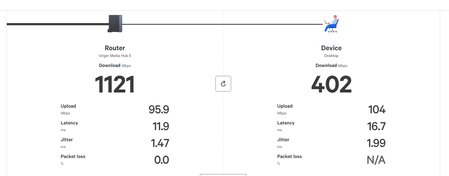
I have a solid PC & have up to date network drivers Realtek ethernet 2.5gbe Just today ive ran cat 8 cables from the router to PC and still getting these results on samknows real speed? Speedtest.net and other speedtest sites show atleast 900mbps download? Any ideas?1.1KViews0likes15CommentsPs5 + Virgin issues
For the last 2 days I’ve been having issues with my Virgin broadband and my ps5, all speed checks etc come back fine but whenever a game needs to request data from a server or connect to a server there is connectivity issues which either fails or takes forever. Ive tried contacting Virgin who says there is an issue with an error saying “Hub levels out of spec - engineer required” but I’ve now seen multiple posts on Reddit all have issues and the only thing in common is Virgin broadband. I have tried everything i can think of so any suggestions would be appreciated. tried a reset, modem mode, turning off smart channel, trying a guest network, port forwarding, wired, wireless, messing with settings on the router itself but it works perfectly fine on my hotspot so i know this is a virgin issue with ps5s1.4KViews3likes7CommentsEthernet, gaming problems
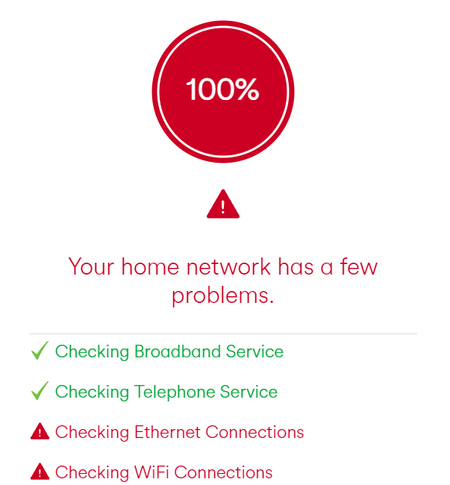
Hello all, I recently got a new router put in the house and I ran a diagnostics test the other day to see why my game input felt slightly delayed for my gaming pc. It turns out there is a problem with the ethernet (and wifi)? I use tp links could this just be the problem although they seemed to be fine with the old router.657Views0likes3CommentsHigh Ping in online gaming (PS5)
Hey, I’m struggling with really high ping in online gaming, varies between 48-90 ping then sometimes shoots to 121ping. I play on my own servers I’ve tried everything possible I even have ExpressVPN router connected thinking that would help the ping but it’s still the same ping. I play on PS5 with Ethernet. Any advice would be appreciated. Many thanks.978Views0likes2Comments