Intermittent broadband
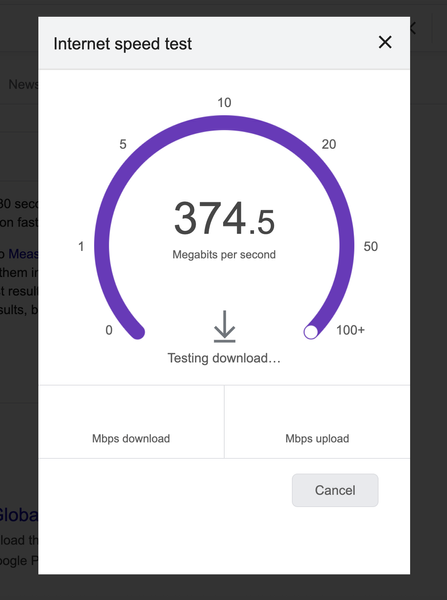
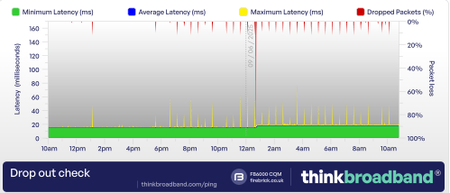
Hi, I have been a VM broadband customer for many years. I am on the M350 broadband package. Over the past week I have had frequent internet dropouts spanning multiple days. Annoyingly this is happening intermittently which makes it harder to debug. There are no known broadband issues in my area. My internet can be working fine for a good few hours but suddenly I will have no internet bandwidth on my devices and I am unable to access any web pages. When this happens the connection drops for varying periods of time ranging from a few mins to sometimes as long as an hour. When I have no internet connection there doesn't appear to be any change in the status lights on the superhub. I have the superhub 5 which I upgraded to over 4 months ago and it's been working absolutely fine until last week. The superhub is running in router mode. I connect from multiple devices over wifi and there is no difference which device im using, the problem occurs on all of them. I have tried restarting the superhub many many times. Sometimes the internet comes back when the hub reboots but often it doesn't. When the internet is working I get very fast speeds: I setup a Think Broadband broadband quality monitor a few days ago. Below you can see some graphs over the past few days... Friday had no dropped packets: Saturday had some: This morning / overnight has been terrible: I would appreciate some help to try and understand what's going on here as it's been extremely disruptive especially when im working from home. Thanks in advance501Views2likes9Comments
Hub 5 dropout
Afternoon, I recently contacted VM to discuss possibilty of obtaining a pod to assist an issue in 1 room of our house that has low wifi signal and they accepted that 1 was required, but as i refused to pay the £8 monthly charge (i don't agree with it), they then offered to upgrade my b/b to 1gig package and sent the new hub5. Since it has been about 10 days now, i am finding the Hub 5 keeps dropping signal in that my phone says connected to wifi but no internet access. Having used the VM Connect app, it does a test and says unable to connect to network but then it can connect instantly and says all is good. I have also noticed the wifi coverage is nowhere near as good as it should be in other areas of the house, rather than the 1 initial room that we had previously. In the room where the hub is, we have full strength wifi. Reading the forums now, it appears many other people have experienced similar issues with Hub5 so hopefully someone from VM can help here as the webchat option is waste of time in my experience. ThanksSolved335Views0likes13CommentsSYNC Timing Synchronization failure - Loss of Sync
Hi All, first post here, and its for syc timing errors. this issues started a few days ago , the internet was cutting out and then coming back. i have rebooted all the kit. switched it off for 10 mins and then turned it back on etc etc. still getting the same issue. called VM and the automated system said they needed to send a signal to the kit, did that and it rebooted everything. still same issue. Network Log: Time Priority Description 22/06/2020 10:35:56 Warning! RCS Partial Service;CM-MAC=**:**:**:**:**:**;CMTS-MAC=**:**:**:**:**:**;CM-QOS=1.1;CM-VER=3.0; 22/06/2020 10:35:56 critical SYNC Timing Synchronization failure - Loss of Sync;CM-MAC=**:**:**:**:**:**;CMTS-MAC=**:**:**:**:**:**;CM-QOS=1.1;CM-VER=3.0; 22/06/2020 09:00:45 Warning! RCS Partial Service;CM-MAC=**:**:**:**:**:**;CMTS-MAC=**:**:**:**:**:**;CM-QOS=1.1;CM-VER=3.0; 22/06/2020 06:41:17 Error DHCP REBIND WARNING - Field invalid in response;CM-MAC=**:**:**:**:**:**;CMTS-MAC=**:**:**:**:**:**;CM-QOS=1.1;CM-VER=3.0; 21/06/2020 23:10:52 Error DHCP RENEW sent - No response for IPv4;CM-MAC=**:**:**:**:**:**;CMTS-MAC=**:**:**:**:**:**;CM-QOS=1.1;CM-VER=3.0; 21/06/2020 18:03:14 Warning! RCS Partial Service;CM-MAC=**:**:**:**:**:**;CMTS-MAC=**:**:**:**:**:**;CM-QOS=1.1;CM-VER=3.0; 21/06/2020 17:58:32 critical SYNC Timing Synchronization failure - Loss of Sync;CM-MAC=**:**:**:**:**:**;CMTS-MAC=**:**:**:**:**:**;CM-QOS=1.1;CM-VER=3.0; 21/06/2020 17:28:4 Warning! RCS Partial Service;CM-MAC=**:**:**:**:**:**;CMTS-MAC=**:**:**:**:**:**;CM-QOS=1.1;CM-VER=3.0; 21/06/2020 15:40:31 Error DHCP RENEW sent - No response for IPv4;CM-MAC=**:**:**:**:**:**;CMTS-MAC=**:**:**:**:**:**;CM-QOS=1.1;CM-VER=3.0; 21/06/2020 09:14:47 Warning! RCS Partial Service;CM-MAC=**:**:**:**:**:**;CMTS-MAC=**:**:**:**:**:**;CM-QOS=1.1;CM-VER=3.0; 21/06/2020 09:13:50 critical SYNC Timing Synchronization failure - Loss of Sync;CM-MAC=**:**:**:**:**:**;CMTS-MAC=**:**:**:**:**:**;CM-QOS=1.1;CM-VER=3.0; 21/06/2020 08:22:22 Warning! RCS Partial Service;CM-MAC=**:**:**:**:**:**;CMTS-MAC=**:**:**:**:**:**;CM-QOS=1.1;CM-VER=3.0; 21/06/2020 00:39:48 Error DHCP RENEW sent - No response for IPv4;CM-MAC=**:**:**:**:**:**;CMTS-MAC=**:**:**:**:**:**;CM-QOS=1.1;CM-VER=3.0; 20/06/2020 21:58:27 Warning! RCS Partial Service;CM-MAC=**:**:**:**:**:**;CMTS-MAC=**:**:**:**:**:**;CM-QOS=1.1;CM-VER=3.0; 20/06/2020 21:58:27 critical SYNC Timing Synchronization failure - Loss of Sync;CM-MAC=**:**:**:**:**:**;CMTS-MAC=**:**:**:**:**:**;CM-QOS=1.1;CM-VER=3.0; 20/06/2020 21:57:0 Warning! RCS Partial Service;CM-MAC=**:**:**:**:**:**;CMTS-MAC=**:**:**:**:**:**;CM-QOS=1.1;CM-VER=3.0; 20/06/2020 21:18:8 critical SYNC Timing Synchronization failure - Loss of Sync;CM-MAC=**:**:**:**:**:**;CMTS-MAC=**:**:**:**:**:**;CM-QOS=1.1;CM-VER=3.0; 20/06/2020 21:16:36 Warning! RCS Partial Service;CM-MAC=**:**:**:**:**:**;CMTS-MAC=**:**:**:**:**:**;CM-QOS=1.1;CM-VER=3.0;Solved34KViews1like105CommentsPACKET LOSS/DROPS
I've been having issues where my connection experiences spikes and complete dropouts, 30 minutes apart. I have been running BQM since Friday 6/6/25, as you can see in the attached graph from 8th-9th, the space between drop outs are quite consistent. I have: - Fully reset to factory settings. - Disabled IP Flood Detection (suggested solution on another site) - Tested other devices (another PC, 4 Phones, Xbox Series X, 2 TVs) all experience the same connection issues. - Pinged various IP Addresses and all came back with no loss. I am connected via Ethernet to the 10gbps port, my PCs ethernet port is compatible with those speeds: https://www.speedtest.net/my-result/d/812c9d78-d2e7-4766-9f17-9cd7acd688b1 Other devices are Wifi (PC is Wifi 6, rest are 5ghz/2.4ghz) Package Info: 2gig up and down These are my router stats: PON modem status Online Connection mode IPOE IPv4 firewall Online IPv6 firewall Online IP_VOIP Down IP_DATA Up Transceiver temperature 29 Transceiver voltage 3 Laser bias current 12 ONT transmit power 5200 ONT receive power -16400 Network access Allowed Baseline Privacy disabled PON Mode XGS-PON 09-06-2025 11:12:46 notice GUI Login Status - Login Success from LAN interface 09-06-2025 11:11:29 notice erouter0 ipv6 address is empty 09-06-2025 10:56:29 notice erouter0 ipv6 address is empty 09-06-2025 10:41:29 notice erouter0 ipv6 address is empty 09-06-2025 10:31:20 notice GUI Login Status - Login Success from LAN interface 09-06-2025 10:31:14 notice GUI Login Status - Login Success from LAN interface 09-06-2025 10:30:37 notice GUI Login Status - Login Success from LAN interface 09-06-2025 10:30:06 notice GUI Login Status - Login Fail from LAN interface 09-06-2025 10:26:29 notice erouter0 ipv6 address is empty 09-06-2025 10:11:29 notice erouter0 ipv6 address is empty 09-06-2025 09:56:29 notice erouter0 ipv6 address is empty 09-06-2025 09:41:29 notice erouter0 ipv6 address is empty 09-06-2025 09:36:50 notice IPoE IPv4 ping failed 09-06-2025 09:26:29 notice erouter0 ipv6 address is empty 09-06-2025 09:11:29 notice erouter0 ipv6 address is empty 09-06-2025 08:56:29 notice erouter0 ipv6 address is empty 09-06-2025 08:41:29 notice erouter0 ipv6 address is empty 09-06-2025 08:37:10 notice IPoE IPv4 ping failed 09-06-2025 08:37:00 notice IPoE IPv4 ping failed 09-06-2025 08:26:29 notice erouter0 ipv6 address is empty 09-06-2025 08:11:29 notice erouter0 ipv6 address is empty 09-06-2025 07:56:29 notice erouter0 ipv6 address is empty 09-06-2025 07:41:29 notice erouter0 ipv6 address is empty 09-06-2025 07:36:49 notice IPoE IPv4 ping failed 09-06-2025 07:36:39 notice IPoE IPv4 ping failed 09-06-2025 07:26:29 notice erouter0 ipv6 address is empty 09-06-2025 07:11:29 notice erouter0 ipv6 address is empty 09-06-2025 06:56:29 notice erouter0 ipv6 address is empty 09-06-2025 06:41:29 notice erouter0 ipv6 address is empty 09-06-2025 06:36:59 notice IPoE IPv4 ping failed The network logs go much further, with regular error messages stating "IPoE IPv4 ping failed". This will be the 2nd router I am on, having the 1st replaced by an engineer for similar issues. Frankly, at £96 per month, I expect a far superior service. The speeds are good, sure, fantastic even. But it's no good having "lightning speeds" when you can't use them! If anyone else is experiencing this issue, or similar, please feel free to contribute your findings. VM, I eagerly await your advice/solutions as this is now affecting my employment. Regards.606Views0likes6CommentsFrequent and disruptive internet drop-outs
Greetings, I have been a Virgin Media customer for almost a year now and the entire time I don't believe I have been receiving anything like the service that I'm paying for. I've had frequent and relentless drops in connection, practically daily, for weeks at a time. the drops last from anywhere between 2 minutes and half an hour. Hours spent on the phone to technical support in god-knows-where has yielded zero improvement and were a waste of my time. These mainly consisted of the operator on the other end just running tests on my connection. Which at the time of the call (when the internet was working again) unsurprisingly showed that the internet was, in fact, working. Detective work that I could do myself, frankly. These problems are impacting me in the form of an annoyance but are affecting my partners ability to do her job. Countless meeting abruptly ended for an unknown period of time is taking its toll. I would like to know why this keeps happening.701Views0likes4CommentsMultiple Internet losses daily, up to 30 x 4 min
I get up to 30 "Internet not available" sessions of around four minutes each time. I have used short and long resets, no change. Reduced the devices, no change. It's almost better to hot-spot my phone than use this now. Had an engineer booked yesterday, that magically cancelled and was booked today. If I'm in and they fail to show, do I get £25? I'm at the point of needing this contract cancelled. It's 1Gig, Hub5, but it's appalling. I have to work from home and it can't hold a connection long enough to Teams or keep connected to central files, it compromises my security system and I have no idea what to try next!707Views0likes5Comments