Forum Discussion
munrobasher
3 years agoUp to speed
I've come to the conclusion that VM are unable fix this software problem and we have to live with it. Fortunately one isn't often accessing the console and if you are (e.g. changing firewall/port forwarding frequently) then you're probably a more power user and should consider switching to a different router and using the Superhub in modem mode.
I can only guess what information the router stores to determine who is logged on (local IP, MAC address, time etc) but that whatever the logic is uses to determine if you're the same user is broken.
Client62
3 years agoAlessandro Volta
Using Firefox the Hub 3 works a charm in the Port Forwarding management screen.
Does the Hub 3 fail during Port forwarding in Chromium browsers Chrome & Edge ?
- wiry3 years agoOn our wavelengthAfaik the port forwarding functionality works fine, just logging into the router is awfully unreliable.
- munrobasher3 years agoUp to speedYes, the port forwarding works fine but I tend to find when editing that is when I get locked out.
- munrobasher3 years agoUp to speedThe port forwarding works fine but it's when editing the port forwarding rules that you tend to get locked out. The scenario is something like this:
1. Make a change to port forwarding
2. Go away and maybe test that, leaving the console open
3. Come back (say) 5 mins later and try making another change
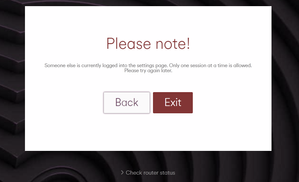
4. You get locked out with other user logged in
My theory is that this happens most on port fowarding because that's a screen that you might hang around in. Most other changes to the router are done and finished in minutes.
So the fault is most likely the current session timing out without the user cleanly leaving thus when you attempt to logon on again, it thinks somebody else is in there.- Client623 years agoAlessandro Volta
If I get locked out of the Hub 3, I close the web browser, restart the web browser and visit the Hub 3 >>> Check router status pages
Now wait (a couple of minutes) for the browser to create the Hub 3's cookie "192.168.0.1"
Once the "192,168.0.1" cookie can be seen Remove it & now I can re-login to the Hub 3 menus.
- munrobasher3 years agoUp to speed
Happened to configure a site with a Virgin Media business service yesterday using the Hitron router. That has an option to "Force logout" which is a much better solution IMO. Shame the home hub doesn't work in the same way.
Related Content
- 2 years ago
- 2 years ago
- 2 years ago
- 11 months ago