Yealink sip-t64u help needed urgently!
Hey all, My wife uses a Yealink sip-t64u phone to work remotely. It used to work for weeks at a time, stop for a while and then take weeks to work again. We had a Hub 3 and plugged the phone into a TP-link extender via ethernet cable. Recently the phone stopped working (the extender and phone were accidentally switched off) and it hasnt come back. We spoke to Virgin who upgraded our broadband speed to 1gb and we now use a Hub 5. We set it up today by plugging it in to the router via ethernet cable and initially it worked. We moved the phone upstairs and used our TP link extender and again, success. Foolishly we unplugged the extender and phone so we could better organise her desk and now the phone says service unable once again. Strangely when we plug the phone into a Virgin router at my sister's house, the phone works and ditto when it is plugged in at the office. We are at our wits end and I'm desperate to get this sorted. I've read that Virgin hubs are notoriously bad at enabling VOIP phones to work. I've also read that putting the hub into modem mode and using our own router is the way to go but we have no idea which router would work. We even have a Virgin technician booked to come and have a look om Wednesday but I fear this won't help. Please help, kind strangers!192Views0likes12CommentsUDP issues on SuperHub3 - collective thread
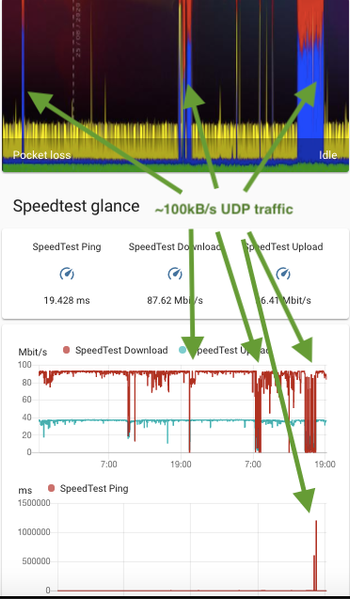
Hi. I decided to open a collective thread for UDP issues on SuperHub3, as it seems that many users are pestered by them, the impact is high and Virgin Media is not aware or fails to acknowledge the issue so far (they've been trying to fix my issues for a past year and nobody ever suggested that this has anything to do with UDP packets, until i found whats exactly the issue on my own). This is the main thread for those issues was this one: https://community.virginmedia.com/t5/Speed/My-350Mb-connection-is-throttled-to-10Mb/td-p/3953746/page/15 but it was originally created over a year ago and has a slightly misleading title. What we know so far: 1. The issue only occurs on SuperHub3 (and reportedly on SuperHub4) modem. SuperHub2 users are not affected. 2. The issue occurs if an app/service is using an UDP connection to the internet. Examples of such apps: BBC Iplayer app, most online games, Microsoft Teams, Skype, third party VoIP apps, all kinds of VPN apps, torrent download apps. 3. All UDP connections are performing very badly on Superhub3 modem, but also whenever there's a significant UDP traffic passing through the modem, other, non-UDP internet connections are slowed down to crawling speeds. 4. Depending on an user, the reported slowdowns are to between 10Mbps and 2kbps (!) speed measured through Speedtest. At the same time ping times go up all the way to 2000+ ms and huge packet losses (sometimes over 40%) occur. In other words, even web browsing is not possible if there's a significant UDP traffic going on through modem. 5. VM street level fixes do not fix the problem - i had a whole uplink cable between CATV manhole and Virgin Media cabinet replaced by VM and it has not fixed the issue. 6. Replacing a modem does not fix the problem either - replacement SuperHub3 modems also have same issue. 7. Here's how the issue looks like on ThinkBroadband/Speedtest with just 1Mbps of UDP traffic flowing through the modem: It's really sad, that Virgin Media fails to acknowledge this problem, as hundreds, if not thousands of people may be severly affected by it. The advice VM is giving out to the users is unhelpful and sometimes harmful (I've been told i need to chase the walls in the newly refurbrished house to replace my VM cable and desperate to fix the problem I have done that). Just look how many threads are being open on this forum describing similar issues with apps using UDP connections.29KViews10likes197Comments